
What is on the first screen
Read from the top, the page answers a reviewer's questions in the order they come up: which file, against what; how well built; when it finishes; what needs looking at; what drives the date; what changed.
| Part | What it shows | Source |
|---|---|---|
| Identity line | The file, its data date, the activity and relationship counts, and the update it is compared with. The counts are the population the review is counted over; hover for how it differs from the file's row count | Data Mapping |
| Schedule health | A letter grade and its word, the composite out of 100, the DCMA 14-point pass count and the GAO conformance index | DCMA 14-Point Assessment |
| Project finish | The latest forecast finish, its movement against the prior update, and its position against a contractual date the file imposes | Critical Path, Month-over-Month |
| Needs your attention | Up to eight findings, red before amber, each a count, a title and one sentence; the checks that passed as chips beneath | The page each card opens |
| Completion & milestones | The finish against the prior update, the baseline and the contractual date; the remaining key milestones with their float and movement | Month-over-Month |
| Critical-path health | Activities on Float Path 1, overlap with the prior path, CPLI, near-critical work and the total-float profile of unfinished work | Critical Path, DCMA |
| Critical work, next 30 days | Every critical start or finish within 30 days of the data date | Critical Path |
| What changed this period | Activities and relationships added and deleted, duration changes, float lost, newly completed, actual dates changed | Month-over-Month |
There is no per cent complete on the page, by design. A count of finished activities weighs a one-day submittal the same as a two-hundred-day tunnel drive, and no single weighted figure can be quoted without saying what it is weighted by. Weighted progress is on the Earned Value page, measured on a resource you nominate.
How the health grade is scored
The grade is a roll-up of the DCMA 14-point checks and nothing else. Each applicable check scores 100 when it passes, 55 when it is a watch (beyond its limit but within twice it) and 10 when it fails, and the composite is the plain mean, every check counting once. A check that cannot be evaluated drops out rather than scoring: missed tasks and the baseline execution index without a baseline, or negative float when float is measured only to the schedule's own finish and nothing in the file imposes a date. Check 10, resources, is reported on the DCMA page and never scored, so thirteen is the most the grade can carry.
| Grade | Composite | Word on screen |
|---|---|---|
| A | 85 and above | strong |
| B | 70 to below 85 | generally sound |
| C | 55 to below 70 | mixed |
| D | 40 to below 55 | weak |
| F | below 40 | poor |
Beside the grade, GAO conformance reads the same checks against the characteristics of a reliable schedule in GAO-16-89G. Comprehensive takes logic, long durations and resources; well-constructed takes logic, leads, lags, relationship types, hard constraints, negative float, the critical path test, CPLI and high float; controlled takes invalid dates, missed tasks and BEI. Each is the mean of its checks on the same scale, and the index is the mean of the three. Credible rests on traceability and a schedule risk analysis, which this review does not measure, so it is reported as not assessed.
The grade measures how the schedule is built. It does not include the red-flag register, the AACE 53R-06 update review or the riding-the-data-date analysis, each of which carries its own verdict. The scale and the letter bands are Trestle Path's convention, and each check's limit is DCMA's default unless you set your own under DCMA14 Limits. Read the failing checks, not the letter.
The grade is not the verdict
The review verdict is worked out when the review loads and printed on the front page of the Comprehensive Quality & Forensic workbook, in the Report Composer and in the printable report. The Overview carries the grade and leaves the verdict to those deliverables. The verdict is the worst of six section verdicts, with one rule that stops the front page reading worse than its evidence:
| Section verdict | What it can do to the front page |
|---|---|
| The reliability scorecard (GAO), the DCMA 14-point check, missed tasks against the baseline | Lower it to caution, never to fail: they are discussion triggers, not acceptance criteria |
| The composite grade | A or B leaves it; C, D or F lowers it to caution |
| The AACE 78R-13 baseline review, the AACE 53R-06 update review, the red-flag register | Make it fail |
When more than one section fails, the front page names the first in a fixed order. A well-built schedule can still fail: rewriting history the prior update had already reported is a hard error under AACE 53R-06, whatever the network looks like.
Needs your attention, and what clears
Each card is a count, a title and one sentence on a coloured rail. Red is worth a review comment; amber is worth a question. Red cards come first, no more than eight are shown, and each opens the page where the finding is evidenced, usually the register of the activities behind the count.
| Card | When it shows | Rail |
|---|---|---|
| Negative float | Any unfinished activity below zero total float | Red |
| Changed historical actual dates | An actual start or finish the prior update reported has changed or gone. Counted in dates, with the activities in the sentence | Red |
| Actuals past the data date | Work statused in the future | Red |
| Float held in durations on the critical path; slip absorbed by float held as work | An unfinished critical activity named as float, a buffer, contingency or a schedule allowance (amber); one of them cut this period while another activity slipped (red) | Amber or red |
| Critical path shifting, or re-routed | 70 to 89 per cent of the prior update's remaining critical path is still on it (amber), or less than 70 per cent (red) | Amber or red |
| Behind the prior plan | Activities the prior update had due to start or finish by the data date that have not | Amber; red above 20 |
| Hard (two-way) date constraints | Mandatory start or finish, start on, finish on, on unfinished work: what DCMA check 5 counts | Red when check 5 fails, amber otherwise |
| Late-date constraints (soft) | Only when there are no hard ones: finish on or before, start on or before, each of which should trace to a contract date | Amber |
| Out-of-sequence progress | Work progressed against a predecessor still open at the data date | Amber for 1 to 10, red above 10 |
| Historical out-of-sequence overlaps | None open, but work started before a predecessor that has since finished | Amber |
| Float erosion | Work activities with less total float than in the prior update | Amber |
| Logic deleted | Relationships removed since the prior update | Amber |
| Open-ended logic | DCMA check 1 does not pass | Amber |
| Invalid dates | Dates in conflict with status around the data date (DCMA check 9) | Amber |
A check that passes becomes a chip on the Cleared row. Some chips carry a note, because a pass is only as good as what it was measured against. "No negative float" says whether float was measured to dates the file imposes or only to the schedule's own finish, where nothing can go negative. The critical path every card uses is defined in critical path, longest path and float paths.
Using the first screen
- Load the current update, the prior update and, if you have it, the baseline, then press Run. The comparison half of the page needs the prior; without it the page says what to load. The baseline adds the finish's movement against the approved plan.
- Check the identity line: the right file, the right data date, the right comparison.
- Read the grade and the two figures beneath it. Below a B, open the DCMA page for the failing checks.
- Read the finish and its movement. A finish that moved earlier in a month with nothing completed is as much a question as one that slipped.
- Work along Needs your attention, red first, opening each card.
- Read the three cards: the milestones still ahead, whether the critical path held, and what on it starts or finishes in the next 30 days.
- Finish with What changed this period, then open Month-over-Month for the guided pass through the same changes; the guide to comparing two P6 updates covers it.
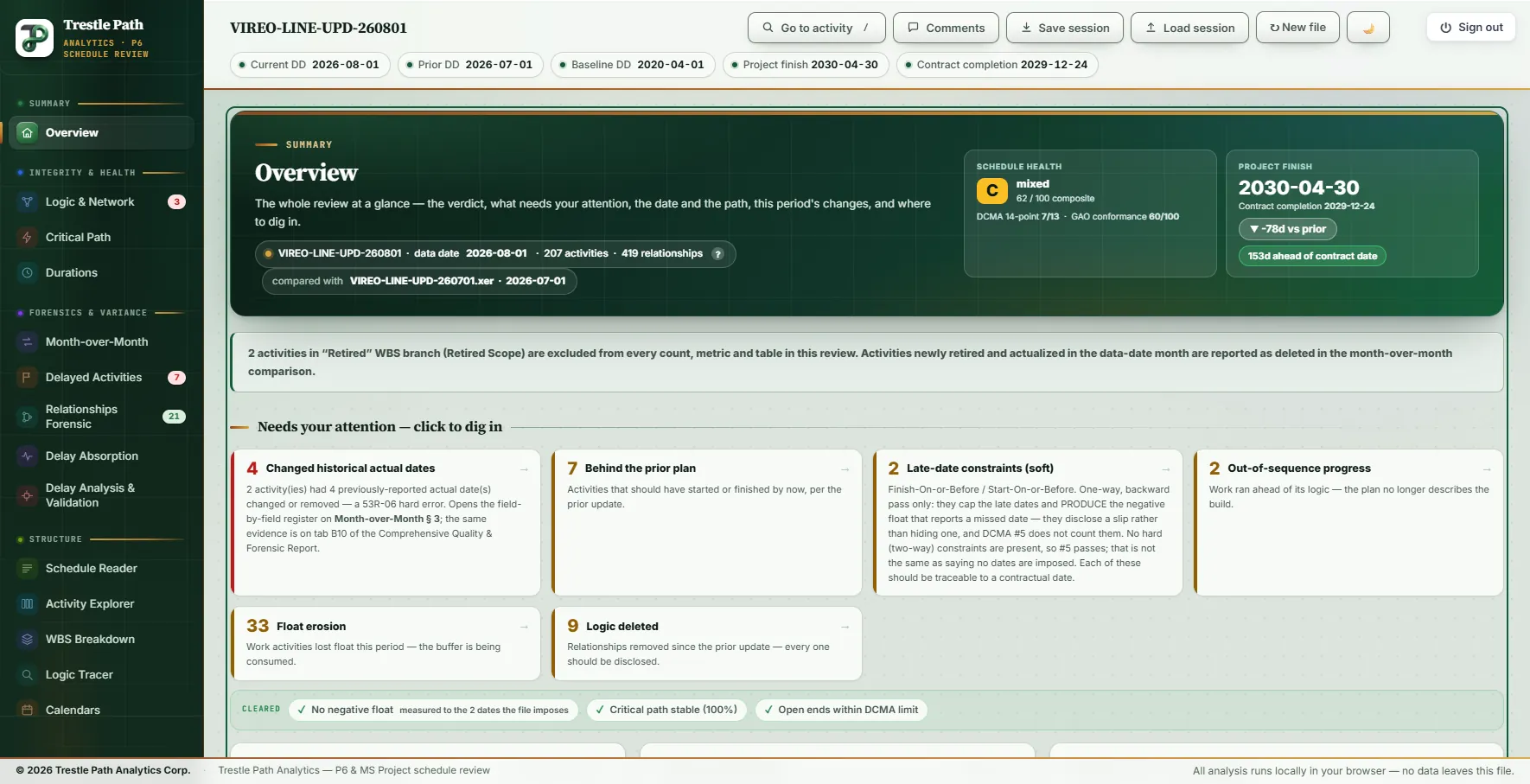
Worked example: a metro extension's August update
The Vireo Line Extension is a fictional twin-bore metro extension with five underground stations, supplied with the product as a demonstration set; nothing in it is real. Its August 2026 update (data date 2026-08-01) was loaded with the July update as the prior and the 2020 baseline.
Who, what and how well built
The identity line reads 207 activities and 419 relationships. The file holds 212 activities: two sit in a WBS branch named Retired Scope and are removed, with their relationships, before anything is calculated, and three level-of-effort activities are held out of the scored metrics. The grade is C, mixed, 62 of 100:
| Result | Checks | Points |
|---|---|---|
| Pass | Logic, leads, hard constraints, negative float, invalid dates, critical path test, CPLI (7) | 700 |
| Watch | BEI (1) | 55 |
| Fail | Lags, relationship types, high float, high duration, missed tasks (5) | 50 |
| Composite | 13 applicable | 805 ÷ 13 = 61.9 |
GAO conformance is 60 of 100: comprehensive 55, well-constructed 70, controlled 55, credible not assessed. The DCMA guide reads each of the five fails on this file; most are the shape of a long metro programme rather than a defect.
The finish
The project finish is 2030-04-30, the Revenue Service Date milestone (VL-MS-0420): 78 days earlier than July's forecast, 25 days later than the baseline's 2030-04-05, and 153 days ahead of the Finish On or Before date of 2030-09-30 that the file imposes on that milestone. Substantial Completion (VL-MS-0410), the milestone Delay Analysis & Validation measures, is forecast for 2029-12-24, 64 days earlier than in July. The header's "153d ahead of contract date" sits under "Contract completion 2029-12-24" but is measured on the project finish; the completion card names the milestone and the constraint.
What needs attention
| Card | Count | What is behind it |
|---|---|---|
| Changed historical actual dates (red) | 4 | Four reported actual dates on two activities: the entrance structures, canopies and plaza at Foundry Square (VL-FS-3140) and Nolan Park (VL-NP-3140) |
| Behind the prior plan | 7 | Elevators and escalators at four stations, the cross-passage linings (VL-CP-4300), the All cross passages complete milestone (VL-MS-0220) and the tunnel fibre backbone (VL-CM-6200) |
| Late-date constraints (soft) | 2 | Finish On or Before on Substantial Completion and on Revenue Service Date. There are no hard constraints, so DCMA check 5 passes |
| Out-of-sequence progress | 2 | The elevators and escalators at Rookery Point (VL-RP-3150), and the instrumentation and settlement monitoring level of effort (VL-LOE-INS), which this check counts as P6's scheduling log does |
| Float erosion | 33 | Work activities with less total float than in July |
| Logic deleted | 9 | Relationships removed since July, against 15 added |
Three checks cleared: no negative float, measured to the two dates the file imposes; the critical path stable at 100 per cent; open ends within the DCMA limit.
The path and the next 30 days
Eighteen activities are on Float Path 1. All 15 of July's remaining critical activities are still on it, so the overlap reads 100 per cent, and three joined it. CPLI is 1.11, against a pass line of 0.95. Of the 77 unfinished work activities, 9 carry zero float or less, 12 are near-critical (above zero and up to 10 days), 15 carry 10 to 44 days and 41 more than 44 days, which DCMA check 6 flags. The only critical start or finish in the next 30 days is the tunnel invert, walkway and drainage in both bores (VL-TF-4400), in progress and due to finish 2026-08-27.
What changed, and the verdict
Against July: 9 activities added and 3 deleted, 15 relationships added and 9 removed, 11 original durations changed, 33 activities lost float, none newly completed, and 4 actual dates changed. The verdict on the workbook's front page is fail, named from the AACE 53R-06 update review. Its one failing check is the four changed actual dates; seven more are at caution, among them six calendar reassignments. The AACE 78R-13 baseline review fails as well. The red-flag register holds 14 flags, eight medium and six low, and one of them is a finish pulled earlier with no identified cause.
What it does not do
- It summarises; it does not analyse. Every figure comes from the analysis behind another section, which is where to check it and where the activities are listed.
- The grade sees construction only. It cannot see rewritten history, deleted logic or a finish pulled in without cause; the verdict, the update review and the red-flag register can.
- Half of it needs the prior update. Without one, the comparison cards and tiles are replaced by a note saying what to load.
- Eight cards at most. When more checks trip, the least severe are left off the screen; their own sections still report them.
- Key milestones are chosen by rule: the project completion first, then completion events, imposed dates and handovers by date, six at most. A milestone the file neither names nor constrains as one is not on the card.
- The contractual date comes from the file, from a finish constraint it imposes. A date that exists only in the contract cannot be shown.
Where to find it
The Overview is included in the Analyst and Expert plans and in the fourteen-day trial, and the review opens on it; a plan without it opens on the first section it includes. It reads P6 XER and MS Project XML. Current prices are on the pricing page. For the same August update read section by section, see the sample review.
Fourteen days free
Try it on your own schedule
Fourteen days free, no credit card, every section open. Your XER or XML file is read in your browser and never uploaded; only anonymous numbers reach the calculation service, and nothing is stored.
RelatedA full sample reviewDCMA 14-point assessmentCritical path, longest path and float paths