
The definitions P6 offers
Total float at or below a threshold
In Schedule Options, P6 can define critical activities as those with total float less than or equal to a figure, usually zero. It is the oldest definition and the easiest to filter on. It is also the easiest to distort: a finish-on-or-before constraint can give a whole chain negative float, a late constraint can give driving work float it does not really have, and an activity on a calendar with a longer or differently timed working day can carry a fraction of an hour of float while it drives the finish.
The longest path
The alternative in the same setting is the longest path: the chain of activities, from the data date to the end of the project, that determines the finish date. P6 stores its answer in each activity's longest-path flag. Because it follows the logic rather than a float value, constraints and calendar differences do not move it.
Multiple float paths
With the advanced option to calculate multiple float paths, P6 numbers the chains that lead to an ending activity: Float Path 1 is the most critical, Path 2 the next, and so on. The paths can be traced by total float or by free float. In free-float mode P6 follows driving relationships, and its documentation says the most critical path is then the same as its longest path. The exception is at the data date, where an activity already in progress can open Float Path 1 without being on the longest path; the example below has one. In total-float mode it groups by float value, and Path 1 can differ from the longest path.
The file keeps whatever P6 last calculated. A schedule exported after a run in total-float mode, or before it was re-scheduled, carries paths that do not describe the logic in front of you.
Worked example: one update, four counts
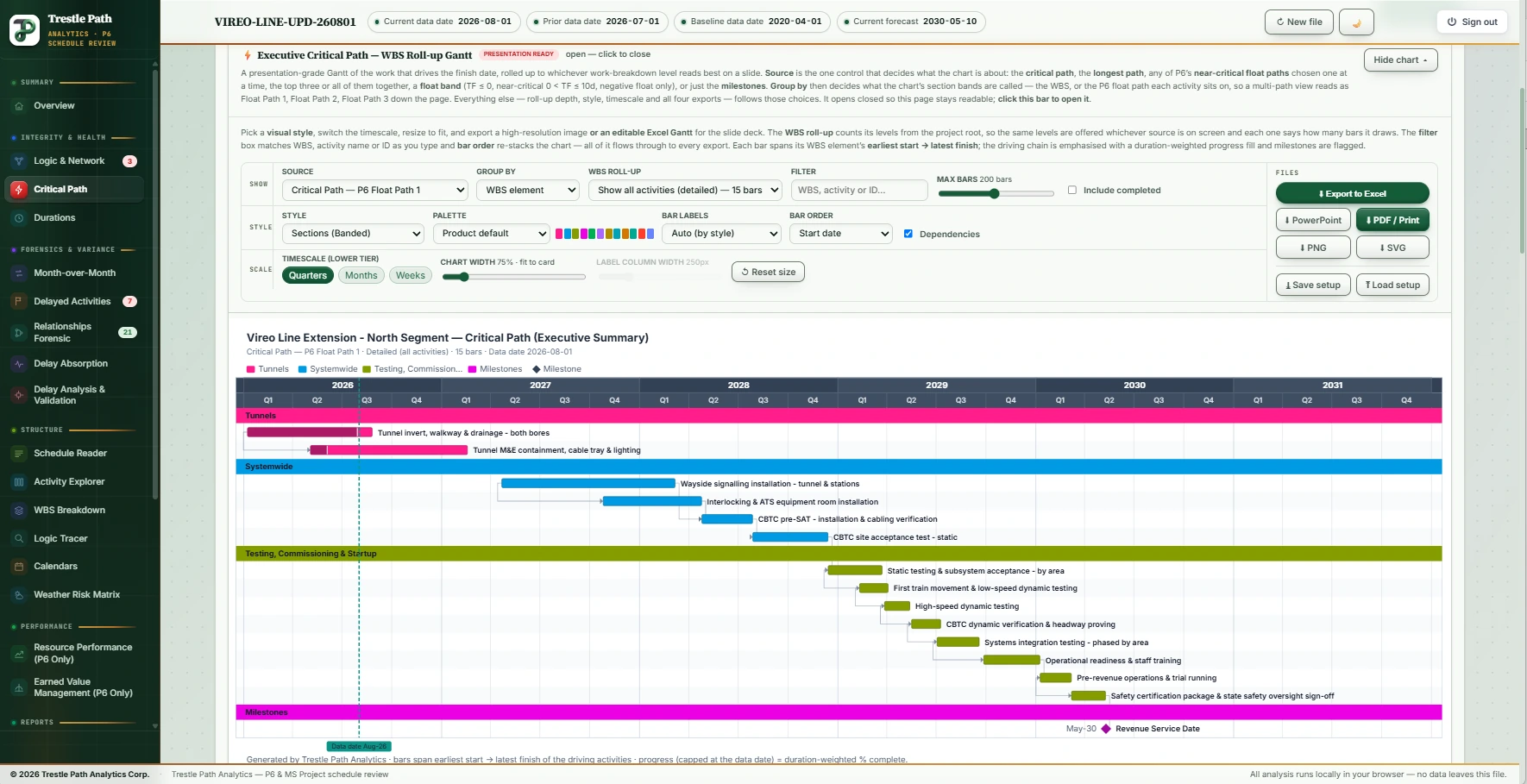
The Vireo Line Extension is a fictional twin-bore metro extension built as a demonstration set of a baseline and eight monthly P6 updates. These are the product's figures for the August 2026 update, data date 1 August 2026, with 77 activities still to do.
| Definition | Remaining activities | What it is |
|---|---|---|
| Float Path 1, free float, from the driving logic | 18 | The path Trestle Path uses: walked back from the latest early finish, the Revenue Service Date (VL-MS-0420, 30 April 2030), through relationships with no relationship free float. Primavera P6 (24.12 and 26.8), scheduling the same file in free-float mode, gives the same eighteen in the same order. |
| P6's longest-path flag | 17 | The activities the file itself marks as longest path. Seventeen of the eighteen above carry it; the one that does not is explained below. |
| The file's stored Float Path 1 | 15 | The float path stored in the file. It leaves out the three activities added this month, so it was not recalculated for this update. |
| Total float at or below zero | 9 | The float test. It keeps the tunnel fit-out, the three Impact 11 activities, the signalling work and the finish milestone, and drops the eight testing activities that follow them. |
Why total float drops eight driving activities
The last test before the finish, VL-TC-7110, ends at 17:00 on 29 April 2030. The Revenue Service Date that it drives can start only at 08:00 the next morning, on the 8-hour design and approvals calendar. The testing calendars work from 07:00 to 17:30, so between the two there are 1.5 working hours: half an hour at the end of the 29th and an hour on the morning of the 30th. That is total float, and it carries back up the chain: the file stores 1.5 hours of total float on each of the eight testing activities. They drive the finish, and a filter for total float at or below zero removes all of them. Nothing is wrong with the schedule. The filter is answering a different question.
Why the longest-path flag has one fewer
The first activity on Float Path 1, in P6 as in Trestle Path, is VL-TF-4400, the tunnel invert, walkway and drainage. It is in progress, it carries 25 hours of total float on its 20-hour tunnelling calendar, and P6 does not flag it as longest path. Its only link to the path is a start-to-start with a 32-day lag into VL-TF-4410, the tunnel M&E containment, and both activities started months ago, on 8 January and 4 May 2026.
The two answers differ because they read that link differently. The float-path trace judges driving links on remaining dates, where the 32-day lag still appears to hold VL-TF-4410, so the trace takes one step back past the data date. The longest path follows the scheduling pass: VL-TF-4410 has started, a start-to-start link can only hold a start, and its remaining work begins at the first working hour after the data date. For the question “what drives the finish from here”, the path starts at VL-TF-4410, and the tunnel invert, already started, is not on it. Trestle Path shows the full longest path with the Float Path 1 activities tagged, so a reviewer sees both lists and the one activity where they part.
What else the section reports on this file
- Three activities are new on the path since July: IMP-11.1 to IMP-11.3, the Impact 11 fragnet, which first appears in this update. A path that changes because a claim was inserted into it is a finding in its own right; the delay guide takes it further.
- Seven start-to-start links and seven lags on the path. Every link that is not finish-to-start with no lag is one to read.
- No negative float. Every constraint date is achievable on the current logic.
- A critical path length index of 1.11, measured from the forecast finish (30 April 2030) to the finish-no-later-than date of 30 September 2030.
- Twelve near-critical activities with total float above zero and up to ten days, more than the nine the float test calls critical.
Paths 2 to 10
The next chains, traced by free float, get close to the finish quickly: Path 2 is a single activity four days off the path.
| Path | Activities | Lowest total float |
|---|---|---|
| 2 | 1 | 4 days |
| 3 | 5 | 10 days |
| 4 | 7 | 11 days |
| 5 | 1 | 22 days |
| 6 | 1 | 20 days |
| 7 | 2 | 14 days |
| 8 | 1 | 30 days |
| 9 | 1 | 48 days |
| 10 | 4 | 48 days |
The paths are not ordered by float. In free-float mode a path's number comes from the relationship free float where its branch joins an earlier path, counted in working hours, not from the lowest total float on it, which is why Path 6 has less total float than Path 5. The hours matter where calendars of different lengths meet: Path 4, the traction power chain, joins the critical path with 88 working hours to spare (11 days on its eight-hour calendar), and the single testing activity that becomes Path 6 joins Path 3 with 101.5 hours (10.15 days on a ten-hour calendar). Fewer days, more hours, and P6 counts hours.
How Trestle Path finds the path
The product recomputes the schedule from the activities, relationships, calendars and constraints in the file, on each activity's own calendar, to the minute. It then walks back from the latest early finish through relationships that have no relationship free float; that chain is Float Path 1. Paths 2 to 10 are traced the way P6 traces them in free-float mode: the branch that joins an earlier path with the least relationship free float, followed back along its driving links. The result does not depend on which float-path option the file was saved with.
The rule was measured against P6, not taken from its documentation, and it is checked on seven schedules with P6's own paths as the answer: on four all ten paths match in P6's order; on this update Paths 1 to 9 match in P6's order and Path 10 differs by two activities; on the other two Float Path 1 matches activity for activity (190 of 190 and 49 of 49). The methodology page gives the detail and the known divergences.
What to check in a contractor's update
- Which definition the narrative uses. If the narrative says "critical" and means total float at or below zero, expect it to omit work on longer or differently timed calendars and to include work that a constraint has pushed into negative float.
- Continuity. The path should run unbroken from the data date to the finish. A gap usually means a constraint or an open end is doing the work of logic.
- What joined or left the path since last month, and why. New activities on the path are often a fragnet, a re-sequence or a changed calendar.
- Links and lags on the path. Start-to-start and lagged links are legitimate, and each deserves a reason.
- Calendars on the path. A calendar that is new this month, or a change of working week, can move the finish with no change to any duration.
- The near-critical band. It is next month's critical path, and it is often larger than the critical path itself.
- The stored float paths. If the file's Float Path 1 differs from the longest path, check how the file was scheduled before relying on it.
Where this stops
Ten float paths are shown. On this update Path 10 takes two different activities from P6's (it has the same size and the same lowest float), and beyond the tenth the product's paths diverge from P6's on one of the reference schedules; both are recorded as open on the methodology page. An MS Project XML carries no P6 longest-path flag or float paths to compare with, so for those files the path is derived from the logic in the same way and shown on its own. The path describes the logic in the file: if the logic is wrong, the path is a correct answer to the wrong model, which is why the logic checks sit next to it.
Where it is in the product
Critical Path & Float is part of every plan, from Reader at USD 15 a month. It includes the executive Gantt of the path rolled up by WBS, the longest path, the ten float paths, negative float and the float distribution, each exportable to Excel. The fourteen-day trial has every section open and needs no card.
Fourteen days free
Try it on your own schedule
Fourteen days free, no credit card, every section open. Your XER or XML file is read in your browser and never uploaded; only anonymous numbers reach the calculation service, and nothing is stored.
RelatedHow to compare two P6 updatesDCMA 14-point assessmentHow the numbers are checkedPlans and pricing