
What the assessment is, and is not
The fourteen checks were published by the US Defense Contract Management Agency as a screening tool for contractor schedules. They caught on because they are simple, mechanical and hard to argue with: a count, a population, a threshold. Every serious owner specification since has borrowed from them, often with tighter limits.
What the assessment establishes is schedule quality: whether the network is complete, whether durations and float are in a range that lets the critical path mean something, and whether the file is being statused honestly. What it does not establish is whether the finish date is right, whether the logic is sensible, or whether the project will deliver. A schedule can pass all fourteen and be wrong; it can fail several and be an honest picture of a difficult job. The checks tell you how much weight the schedule can carry; the review decides what to put on it.
The fourteen checks
Populations matter more than thresholds. Most checks are measured on the incomplete activities and the relationships between them, excluding level-of-effort and summary activities; a tool that counts completed work, or counts summaries, produces a different number from the same file. The table gives what Trestle Path counts and the default threshold.
| # | Check | What is counted, and the threshold |
|---|---|---|
| 1 | Logic | Incomplete activities missing a predecessor or a successor, excluding the project's own start and finish milestones. Threshold 5 %. |
| 2 | Leads | Relationships in the remaining network with a negative lag. Target zero. |
| 3 | Lags | Relationships in the remaining network with a positive lag. Threshold 5 %. |
| 4 | Relationship types | Share of remaining relationships that are finish-to-start. Threshold 90 % or more. |
| 5 | Hard constraints | Incomplete activities with a two-way constraint (Mandatory Start or Finish, Start On, Finish On). Threshold 5 %; many owner specifications say 1 % or zero. |
| 6 | High float | Incomplete activities with total float over 44 working days. Threshold 5 %. |
| 7 | Negative float | Incomplete activities with total float below zero. Target zero. Only meaningful when float is measured against a contract date (a must-finish-by or a constrained milestone); without one, the check reports nothing rather than a misleading pass. |
| 8 | High duration | Incomplete activities with an original duration over 44 working days. Threshold 5 %. Level-of-effort activities are excluded. |
| 9 | Invalid dates | Actual dates after the data date, or forecast dates before it. Target zero. |
| 10 | Resources | Incomplete activities with no resource or cost assignment. Target zero, but only applicable to a resource-loaded schedule. |
| 11 | Missed tasks | Activities that were due to finish by the data date in the baseline and have not, or finished late. Threshold 5 %. Needs a baseline. |
| 12 | Critical path test | Add a large duration (600 working days) to a critical activity and confirm the finish moves by the same amount. A finish that moves less means a constraint or open end is holding the date. |
| 13 | CPLI | Critical path length index: (critical path length + total float on it) ÷ critical path length. 0.95 or more passes; below 1.00 the path needs more time than is left. |
| 14 | BEI | Baseline execution index: activities finished by the data date ÷ activities the baseline said would finish by then. 0.95 or more passes. |
Where the arithmetic goes wrong
- Counting completed work. Checks 1, 3, 4, 6 and 8 are about the remaining network. A tool that counts the whole file scores a nearly finished project on links that no longer matter.
- Counting summaries and level-of-effort. A level-of-effort activity spans its neighbours by design; counted under check 8 it is a false long duration.
- Calendar days for working days. The 44-day limits are working days on the activity's calendar. Forty-four calendar days on a five-day calendar is 32 working days, and a check measured in the wrong unit fails or passes activities it should not.
- Negative float with no reference date. Float measured only to the schedule's own finish is never negative. Reporting "0 %, pass" on such a file is not evidence of anything; Trestle Path marks the check not applicable and says why.
- The critical path test done by hand. Adding 600 days to an activity in P6 and re-scheduling changes the file. The product runs the test on a copy in memory and reports the difference.
Running it in Trestle Path Analytics
- Load the current schedule (a P6 XER or an MS Project XML). Load the baseline too if you want checks 11 and 14; load the prior update as well if you want the comparison registers.
- Press Run. Open DCMA 14-Point Assessment.
- Read the summary: passes, watches (beyond the limit but within twice it), fails and the checks marked not applicable. Every meter shows the measured value against its limit; every count opens the activities behind it.
- If your contract sets tighter limits, open DCMA14 Limits and change them; the whole dashboard re-evaluates.
- Read the year-by-year grid: which years of the programme carry the lags, the long durations and the high float. A problem that sits in one year is a different finding from one spread across the job.
- Export: the table, the flagged activities and the thresholds you used go to Excel, so the finding travels with its evidence.
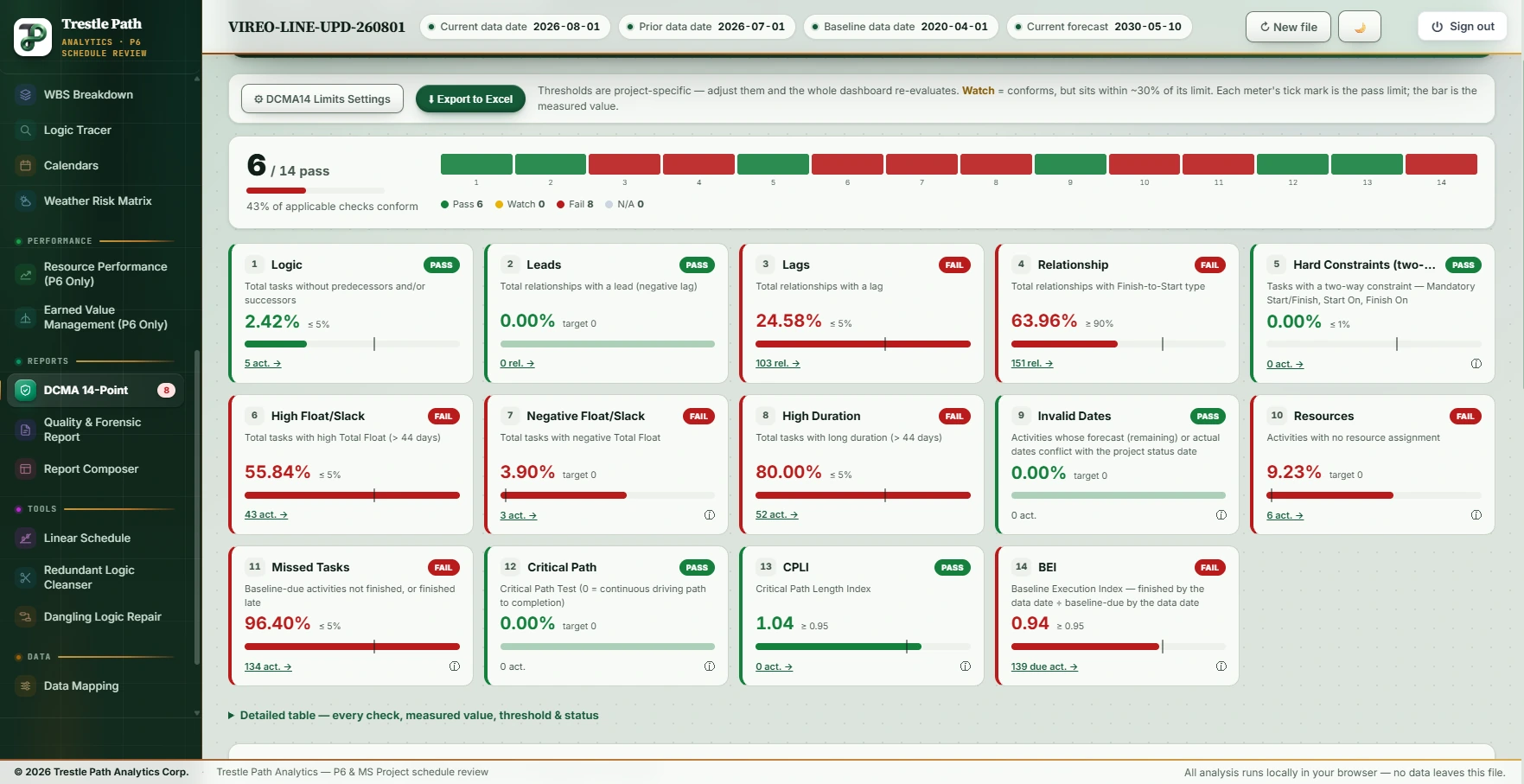
Worked example: a demonstration metro schedule
The Vireo Line Extension is a fictional 22,200 ft twin-bore metro extension with five underground stations, built as a demonstration set of a baseline and eight monthly P6 updates; nothing in it is real. This is the product's run on the August 2026 update, with the July update and the baseline loaded beside it. Seven of thirteen applicable checks pass.
| Check | Measured | Result, and what to make of it |
|---|---|---|
| 1 Logic | 0.00 % · 0 activities | Pass. Five activities in the file have an open end: the Revenue Service Date, the project's finish, which the check exempts by design, and four that are complete, Notice to Proceed among them, which it does not count. |
| 2 Leads | 0 relationships | Pass. |
| 3 Lags | 24.16 % · 43 relationships | Fail. Station-box ladder logic legitimately uses lags; the check fails anyway. The right question is whether each lag stands for real time (curing, a possession window) or is a duration in disguise. |
| 4 Relationship types | 74.16 % finish-to-start · 46 others | Fail. Overlaps are normal on a metro job, but four of these links were finish-to-start last month and are start-to-start now: the change, not the ratio, is the finding. |
| 5 Hard constraints | 0.00 % | Pass. The contract dates are one-way constraints (finish on or before), which the check does not count. |
| 6 High float | 53.25 % · 41 activities | Fail. Expected on a schedule with three and a half years to run: far-term work carries large float. Read with check 1: high float on an activity with a missing successor is a different matter from high float on a well-linked one. |
| 7 Negative float | 0.00 % · 0 activities | Passes. Float is measured to the schedule's own finish and there is no must-finish-by date, but the file imposes a Finish On or Before on its two completion milestones, so a missed date would show as negative float, and none does. With no imposed date at all the product would report not applicable, never a pass. |
| 8 High duration | 80.00 % · 52 activities | Fail. Tunnel drives and station structures are long by nature; the drives are rates (length ÷ feet per day), which is the better test than a 44-day cap. |
| 9 Invalid dates | 0 | Pass. No actual date after the data date, no forecast before it. |
| 10 Resources | 9.23 % · 6 activities | Not applicable as scored; six unresourced activities listed for the reviewer. |
| 11 Missed tasks | 87.86 % · 123 activities | Fail. Against the original baseline, 123 of the 140 activities due by the data date are late or unfinished: the project is well behind the 2020 plan, which every other view of the file confirms. |
| 12 Critical path test | finish moves the full 600 days | Pass: nothing holds the finish date apart from the logic. |
| 13 CPLI | 1.11 | Pass. The critical path has room against the date it is measured to. |
| 14 BEI | 0.93 | Watch. Just under the 0.95 line: the project completes 93 activities for every 100 the baseline said it would by now. |
Limits
- Thresholds are conventions. The 5 per cent and 44-day limits are DCMA's defaults. Owner specifications differ; set yours and say which you used.
- A score is not a verdict. Seven of thirteen is the arithmetic; whether the schedule is acceptable is a judgement about the reasons behind each fail.
- Checks 11 and 14 need a baseline, and check 7 needs a contract date. Without them the product marks the check not applicable rather than passing it.
- MS Project XML carries no activity types, so level-of-effort exclusions rely on the file's summary flags; the counts for checks 8 and 10 can differ from a P6 export of the same schedule.
Where to find it
The DCMA 14-Point Assessment is included in the Analyst and Expert plans and in the fourteen-day trial. Current prices are on the pricing page.
Fourteen days free
Try it on your own schedule
Fourteen days free, no credit card, every section open. Your XER or XML file is read in your browser and never uploaded; only anonymous numbers reach the calculation service, and nothing is stored.