
One question, answered twice
Three cards answer one question: is the approved weight being earned at the rate the approved plan expected?
| Card | Headline | Beneath it |
|---|---|---|
| Schedule Performance Index | SPI = EV ÷ PV | Earned (EV), planned (PV), the weight variance EV − PV, Post-Baseline SPI, and TSPI (work) |
| Planned vs Earned Progress | Earned per cent minus planned per cent, in percentage points of the approved weight | Planned and earned progress, the approved weight (BAC), this update's at completion, and the late-dates plan at the data date |
| Earned Schedule Position | Calendar days ahead or behind, with the word beside the number | SPI(t), the Earned Schedule date, the data date, elapsed time (AT), the plan's own duration (SAC) and TSPI(t) |
Why both: SPI is a ratio of quantities, and at completion everything planned has been earned, so it returns to 1.00 however late the project finished. Earned Schedule, Walt Lipke's extension of earned value, inverts the plan curve instead: it finds the date the approved curve expected to reach today's earned weight, and compares it with the data date. That position does not drift back to on-plan at the end, so late in a job SPI(t) is the figure to quote. Neither is a finish-date forecast: an SPI(t) of 0.92 means 0.92 days of plan earned per day elapsed.
The progress weight: why the page will not guess
Earned value needs a currency of progress. Hours booked, money spent and quantity installed are consumption, and an SPI calculated on consumption looks authoritative and measures nothing. So the page asks two things of you first:
- Name the resource whose baseline at-completion units express approved scope weight and whose actual units express earned progress. Labour, nonlabour and material resources are all eligible; the application's own unit roll-ups are not, because a synthetic sum cannot be matched to a baseline row.
- Tick "Use this resource as earned progress weight". That is a governance decision on your project, not something a file can declare.
Choosing a different resource withdraws the tick, and so does a new set of files. A saved setup brings back the resource, timescale and chart size, never the tick: a contract accepted about last month's schedule is not a contract about this one. For consumption, use Resource Performance, which reads the same distribution.
P6 exports a unit only for material resources, so a cost or value resource arrives in hours. Name the unit on the chip beside the picker; Resource Performance shares the setting. A unit that differs between the baseline and the update blocks the calculation.
The quantities and the formulas
| Symbol | What it is | Where it is read |
|---|---|---|
| B | Earned Schedule origin | The first day of the baseline's plan curve for this resource; the same for the current and the prior update |
| T0 | Baseline cutoff | The baseline's own data date |
| T | Status date | The update's data date, at the exact instant stored in the file |
| BAC | Approved weight | The baseline's actual (regular and overtime) plus remaining units, over every assignment of the resource |
| PV(T) | Weight planned through T | The baseline at-completion curve on its early dates, read at T |
| EV(T) | Weight earned through T | The update's actual units (regular and overtime) through T; any dated after T are excluded and counted |
| PV0, EV0 | The same two at T0 | Calculated independently, never forced equal |
From these: SPI = EV ÷ PV; weight variance = EV − PV; planned progress = PV ÷ BAC and earned progress = EV ÷ BAC, their difference in percentage points; Post-Baseline SPI = (EV − EV0) ÷ (PV − PV0), the same ratio with the approved history divided out. The roll-up happens first and the division once: no activity, WBS or period SPI is calculated or averaged.
The Earned Schedule date (D_ES) is found on the daily plan curve, not the chart's months, so the timescale changes what is drawn and nothing that is calculated. The rules run in a fixed order: complete (the date the plan reached BAC, even when the data date is later), nothing earned, exactly on plan, and only then interpolation between the two days that straddle the earned amount. Then ES = D_ES − B, AT = T − B, SV(t) = ES − AT and SPI(t) = ES ÷ AT, in calendar days.
Nothing is clamped or substituted. Earned weight above BAC, a plan curve that falls or never reaches BAC, or negative earned weight each produce a stated reason in place of the Earned Schedule figures. Data quality lists the checks behind every figure: the baseline match, the unit, the weight's change since the baseline, and the reconciliation of the earned curve to the assignment table.
What the remaining work now requires
SPI and SPI(t) say how the work has gone. The other half of the question is what the remaining work now needs in order to finish on the approved plan, in the to-complete form of PMI's Standard for Earned Value Management:
| Index | Formula | What it says |
|---|---|---|
| TSPI (work) | (BAC − EV) ÷ (BAC − PV) | How much more weight is left to earn than the approved plan had left at this date, in the same time |
| TSPI(t) | (SAC − ES) ÷ (SAC − AT) | The same question in time. SAC is the approved plan's own duration, from B to the day its curve reaches BAC |
| Required rate | (BAC − EV) ÷ (SAC − AT) | The daily rate the remaining weight needs, beside the rate earned so far, EV ÷ AT |
Above 1.00 the rest has to go faster than the plan itself asked for. These are requirements, not forecasts: whether the rate can be met is the question they hand you. The Standard sets no limit. The page reads an index up to 1.00 as no faster than the plan, up to 1.10 as faster and above 1.10 as much faster, and labels the 1.10 line a judgement: a remaining rate more than about 10 per cent above the plan's is rarely met without a named, resourced recovery plan. Once elapsed time passes SAC with weight still to earn, the card says the plan's finish has passed.
The late-dates test sets the earned weight against the approved plan on its late dates at the data date. There are three positions: on or ahead of the early curve; inside the early–late envelope, consuming float; or behind the late curve. AACE 55R-09 reads a project tracking along its late dates in the first 85 per cent of the project as likely to slip, so behind the late curve is the warning sign.
Financial periods and the contractor's own earned value
When the contractor runs P6's Store Period Performance, the file records each period's actuals as reported. The page then offers two more things:
- The actual shape, the switch Resource Performance sets: As P6 calculates or Stored periods. It changes how the earned history is drawn before the data date. No index moves with it: each is read at a data date, where both shapes hold the same total. A note under the chart says what the switch does for the weight you chose.
- A financial-period timescale beside week, month and quarter.
At the foot of the page, The contractor's own earned value, as stored lists what P6 recorded in each stored period: planned, earned and actual hours and cost, and the cumulative SPI and CPI they give, negative periods included. Its scope differs from the cards (the whole project, labour hours only, under the earned-value settings of the contractor's own database), so where the two disagree, that is a finding. It has its own Excel export and needs no baseline.
There is one SPI in a Trestle Path deliverable. The Comprehensive Quality & Forensic workbook's Performance Indices tab and the Report Composer read the same calculation as the cards. The workbook prints no index until the resource is named and confirmed, and carries neither the contractor's stored earned value nor any cost index.
Running it
- Load the current update and the baseline (and the prior update, for the month-on-month line under each card), then press Run. Open Earned Value Management.
- Pick the progress-weight resource: filter by type, or type part of its ID, name or unit. Name the unit on the chip if P6 gave none.
- Tick Use this resource as earned progress weight.
- Read the three cards, then the chart: the approved plan through completion, the earned line ending at the data date, and three markers for the baseline cutoff, the data date and the Earned Schedule date. Drag a marker's label if it overlaps another.
- Switch Actual schedule to Prior to read last month's position on the same baseline.
- Open Calculation details for every input and formula and the exact inversion, and Data quality before quoting anything.
- Export an Excel workbook (summary, period data and data quality), or the chart as PowerPoint, PDF, PNG, JPG or SVG, each the picture on screen. Save the setup for next month.
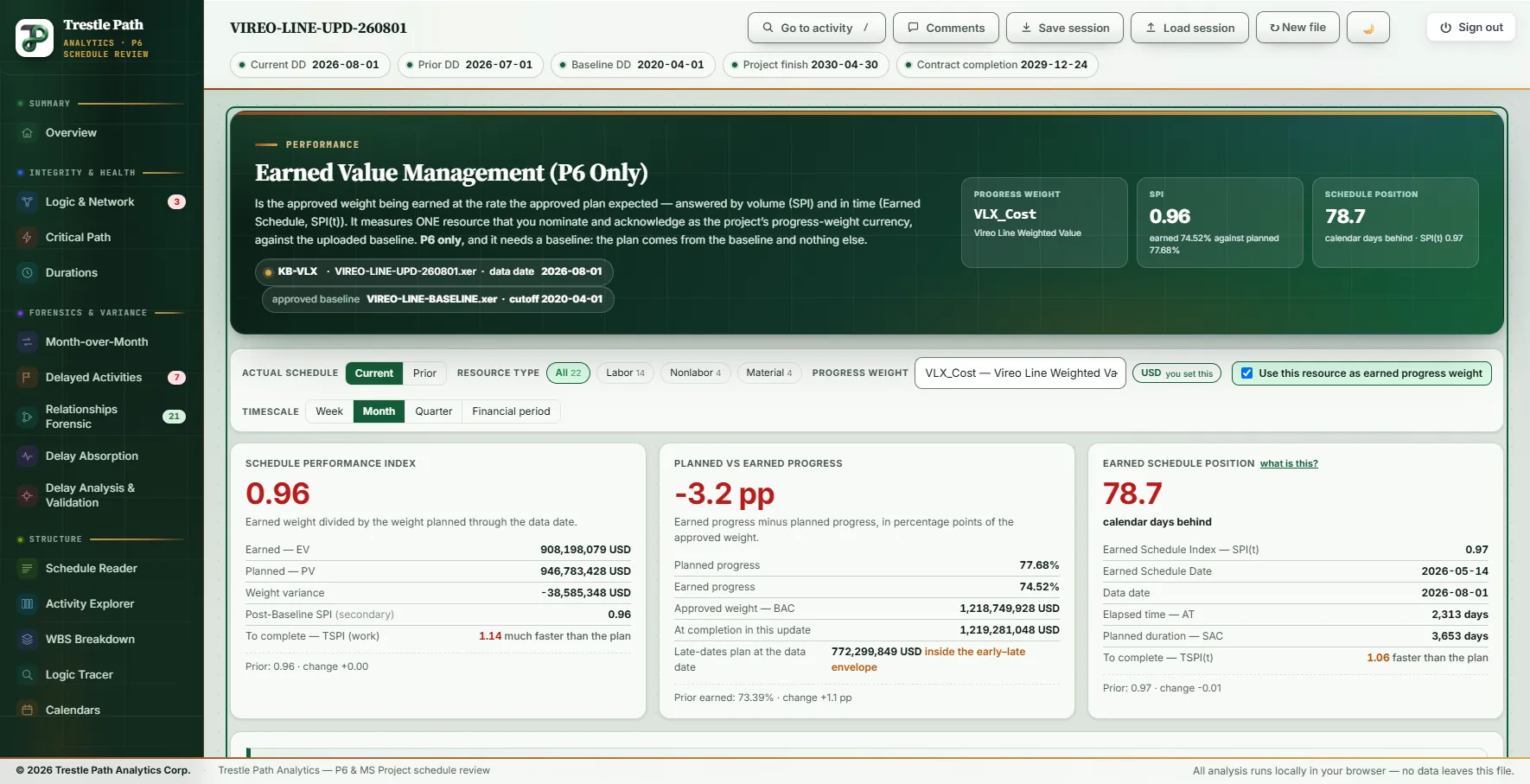
Worked example: a metro extension's August update
The Vireo Line Extension is a fictional twin-bore metro extension with five underground stations, supplied with the product as a demonstration set; nothing in it is real. Its August 2026 update (data date 2026-08-01) was read against the 2020 baseline, with the July update as the prior. The set has 22 resources: 14 labour, 4 nonlabour and 4 material. The progress weight nominated here is VLX_Cost, Vireo Line Weighted Value, a nonlabour resource carrying the contract value on 176 assignments. P6 gives it no unit, so it was named USD on the chip.
| Reading | August 2026 | July 2026 |
|---|---|---|
| EV / PV | 908,198,079 / 946,783,428 USD | 894,450,599 / 932,528,224 USD |
| SPI | 0.96 | 0.96 |
| Planned / earned progress | 77.68% / 74.52% | 76.52% / 73.39% |
| Progress variance | −3.2 pp | −3.1 pp |
| Earned Schedule date | 2026-05-14 | 2026-04-27 |
| Schedule position | 78.7 calendar days behind | 64.9 calendar days behind |
| SPI(t) | 0.97 | 0.97 |
| TSPI (work) / TSPI(t) | 1.14 / 1.06 | 1.13 / 1.05 |
| Late-dates test | Inside the envelope | Inside the envelope |
The SPI did not move; the position did
In July the project earned 13.7 million (894.5 to 908.2 million), close to the 14.3 million the plan set for the month (932.5 to 946.8 million), so SPI stayed at 0.96. On the plan curve, though, 13.7 million carries the project only from 2026-04-27 to 2026-05-14: the Earned Schedule date advanced 17 days while the data date advanced 31, and the position went from 64.9 to 78.7 calendar days behind. The project is earning at roughly July's planned rate while still working through the part of the plan set for May. SPI cannot show that; the position can.
Checking the arithmetic
Calculation details gives more places. The baseline's cutoff, 2020-04-01, is also the first day of its plan curve, so this is a day-zero baseline: PV0 and EV0 are both zero and Post-Baseline SPI equals SPI, 0.9592. The earned amount falls between the plan's daily points for 2026-05-14 (907,957,082) and 2026-05-15 (908,910,911), 0.2527 of the way across. ES is 2,234.253 days and AT 2,313.000 days from B, so SV(t) is −78.747 days and SPI(t) 2,234.253 ÷ 2,313.000 = 0.9660. Data quality passed every check: a match by identifier, a reconciliation residual of 0, and an at-completion weight 531,120 USD (0.04 per cent) above the baseline's, under the 1 per cent at which the page raises a caution.
What the rest of the job needs
TSPI (work) is 1.14: there is 14 per cent more weight left to earn than the approved plan had left at this date, past the 1.10 line. TSPI(t) is 1.06 against a planned duration of 3,653 days. Calculation details also gives the required rate, 231,755 USD a day, against 392,649 USD a day earned on average so far, 0.59 of it, because the approved plan tails off towards its finish. A TSPI above 1.10 and a required rate below the average so far are both true. The earned weight sits inside the envelope, ahead of the late-dates plan of 772,299,849 USD: float is being consumed, and AACE 55R-09's warning sign is not raised.
The stored record
The Vireo files store 76 financial periods, April 2020 to July 2026, and for this weight the stored periods hold all of its actual, so Stored periods draws its earned history entirely from the record. No index changes with the switch. The set stores actuals only, with no stored planned or earned value, so the contractor's panel has no SPI of its own to set beside the cards.
What it does not do
- P6 only, and only with a baseline. The page reads P6's resource assignment tables, which an MS Project XML does not carry, and the plan comes from the uploaded baseline and nowhere else. Without a baseline it says so and stops.
- One resource at a time, chosen by you. The result is only as good as that choice: a resource that is consumption rather than approved weight gives a precise and meaningless SPI.
- No cost index and no forecast. It calculates no CPI, EAC, ETC or VAC and no forecast finish; the only CPI on the page is the contractor's own, as stored. SV(t) is a position, not a completion date.
- No activity or WBS SPI. The roll-up comes first and the division once.
- A macro measure. It does not replace critical path, float or milestone analysis: a project can be behind here with its critical path intact, or the reverse.
- Judgement bands. The TSPI colours and the 1.10 line are conventions, not a standard.
Where to find it
Earned Value Management is included in the Analyst and Expert plans and in the fourteen-day trial, for Primavera P6 schedules. Current prices are on the pricing page. It explains itself in About Earned Schedule, Calculation details and Data quality at its foot. For planned against actual units resource by resource, see resource performance.
Fourteen days free
Try it on your own schedule
Fourteen days free, no credit card, every section open. Your XER or XML file is read in your browser and never uploaded; only anonymous numbers reach the calculation service, and nothing is stored.
RelatedResource performance in a P6 scheduleHow to compare two P6 updatesReading the first screen of a review