
What the page shows
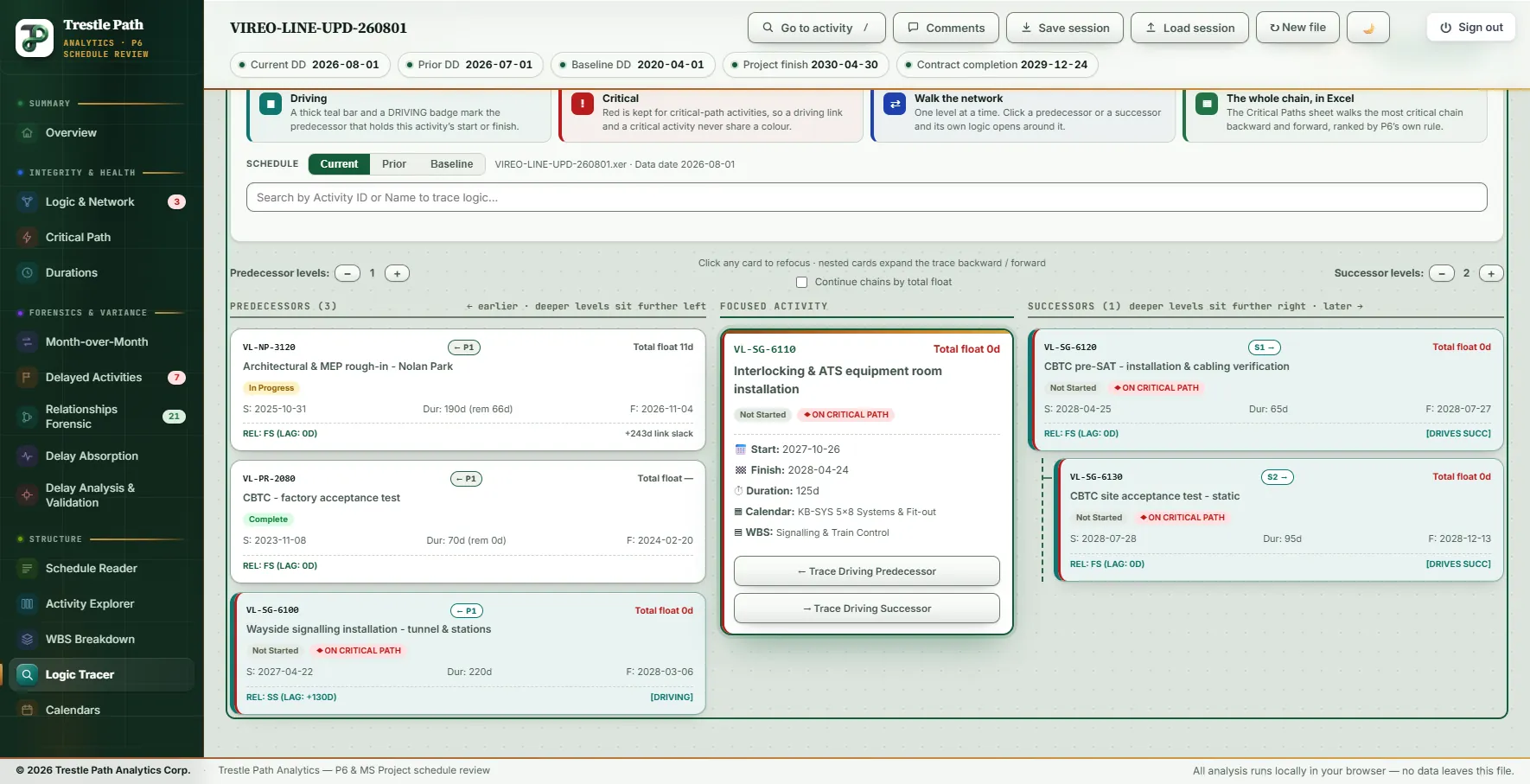
The focused activity sits in the middle column. Its predecessors are on the left and its successors on the right, each as a card tagged with its hop: ← P1 is a direct predecessor, P2 a predecessor of that one, S1 → and S2 the same forward. Deeper levels sit further out.
| On a card | What it says |
|---|---|
| Header | Activity ID, the hop tag, and total float in days, red at or below zero |
| Pills | Status (Not Started, In Progress, Complete), any logic flag, and ◆ ON CRITICAL PATH |
| Dates | Start, finish, and the original duration, with the remaining duration once they differ |
| Link line | The relationship to its neighbour (type and lag), a constraint pill if it has one, and on the right either [DRIVING] (a successor card reads [DRIVES SUCC]) or the link's slack, for example +4d link slack. Hover it for the reason in words |
The focused card adds the calendar, the WBS branch, any constraint, second constraint and expected finish with their dates, and two buttons: Trace Driving Predecessor and Trace Driving Successor. The calendar and the constraints are there because they explain dates that the logic alone does not.
What "driving" means
A link drives when it carries no relationship free float: the date it imposes is the date the successor actually takes, so a day lost on the predecessor is a day lost on the successor. The test is per link, and it is the one P6 reports in its own Driving column. On an XER it is P6's rule exactly: on the remaining early dates, with the lag served on the predecessor's calendar, not one working minute of the successor's calendar lies between the date the link imposes and the successor's own date. Completed work and level of effort drive nothing: an actual date is history, and P6 does not schedule through level of effort. Slack is counted on the successor's calendar to the part day, so a link can read +14.8d. An MS Project XML carries no minutes to count on, so there the test is made at the day.
When the rule was introduced, the tracer was checked against P6 on five real schedules: the walk back from the finish reproduced P6's free-float Float Path 1 on all five, and no link was marked differently from P6.
Driving and critical are different words. Driving is a property of a link; critical is a property of the path. Red is kept for the critical path, which is Float Path 1 within the longest path, traced by free float from the driving logic: the same list the Critical Path page shows. A teal driving bar on a card that is not red is common and correct: the link sets that activity's date, but the activity has float to the finish.
Walking the network
- Choose the focus. Type an ID or part of a name in the search box (up to 50 matches), click any card, or arrive from another page: the activity drawer's name link and the Schedule Reader's Send to both open the tracer on that activity. With nothing chosen, the page opens on the first unfinished activity with zero float.
- Read the fan-in. At the first hop every link is shown, driving or not, and so is every link of each first-hop card. Those are the merges the review is about.
- Go deeper. Predecessor levels and Successor levels each run from one to eight. Further out the trace follows the driving spine only; links that do not drive sit behind + N that do not drive, hidden, not dropped. A card that nothing drives ends its branch with nothing drives this one, so the chain stops here, and the reason on hover.
- Follow the chain. Trace Driving Predecessor moves the focus to the driving predecessor. Where several links drive, it takes the one P6's own trace takes: the latest imposed date, then the more stored free float, then a task before a milestone, then Activity ID. Trace Driving Successor takes the driving successor with the least total float, then the latest early finish, then Activity ID.
- Read why it stops. A button with nothing to follow is switched off, and its tooltip says what holds the date instead: an actual start, a completed activity, a constraint, the data date, or links that miss by a stated number of days.
- Change the schedule. Current, Prior and Baseline read the same trace off another file, keeping the focus where that activity exists.
One switch sits above the columns: Continue chains by total float, off by default. Off, every critical-path chain in the product stops at the last driving link, as P6 traces its longest path. On, a chain that runs out of driving links walks on by relationship total float, the way P6 does in its total-float float-path mode, and marks each such step "TF step" rather than Driving. It applies to the chains on the Activity Explorer, the Gantt's chain mode, the critical-path workbook sheets and this page's export, and is remembered in your browser.
Flags on the cards
| Flag | What it means |
|---|---|
| OPEN START, OPEN FINISH | No predecessor, or no successor, at all. A link only to level of effort or a WBS summary counts as none, because P6 does not schedule through them |
| DANGLING FINISH | Every outgoing link leaves from the activity's start (SS or SF): nothing waits on its finish, so an overrun moves nothing and its float overstates the spare time |
| DANGLING START | Every incoming link arrives at its finish (FF or SF): nothing controls when it may begin |
| ISOLATED | No logic at either end |
| Constraint pill | The constraint type and date, tinted by family: two-way, late-date, or early-date |
Milestones are never flagged as dangling: a milestone is one point in time, so a link out of its start is a link out of its finish. The hover card on each flag gives the links in and out, the exposure and what to check; the logic repair guide covers the fix.
Worked example: a metro extension's August update
The Vireo Line Extension is a fictional twin-bore metro extension with five underground stations, supplied with the product as a demonstration set; nothing in it is real. This trace is on the August 2026 update (data date 2026-08-01). The page opens on VL-TF-4410, Tunnel M&E containment, the first unfinished activity with zero float.
Why the Revenue Service Date is where it is
Search for VL-MS-0420, the Revenue Service Date (2030-04-30). It has two predecessors. The revenue service demonstration (VL-TC-7110) drives it, finish-to-start. The safety certification sign-off (VL-TC-7120) does not: +4d link slack, and 4 days of total float. Its only successor is the project-management level of effort, so the card carries OPEN FINISH and Trace Driving Successor is off: "No link here binds a calculated date".
Press Trace Driving Predecessor seventeen times. The focus walks back through the testing sequence, the signalling installation, the three Impact 11 activities and the tunnel fit-out to VL-TF-4400, the tunnel invert, where the button stops: the activity is in progress, so its start is an actual. That is eighteen activities, the same eighteen, in the same order, as Float Path 1 on the Critical Path page and in P6 scheduling the same file in free-float mode (see the critical path guide). Switch to Prior and the same walk from the July update's Revenue Service Date (2030-07-17) is fifteen activities long: the Impact 11 fragnet is not in it. On the 2020 Baseline, from a Revenue Service Date of 2030-04-05, it runs 41 activities back to the project start milestone, through communications, track and the tunnel drive, with no signalling on it at all.
A merge, read link by link
Focus VL-SG-6110, the interlocking and ATS equipment room installation. Of its three predecessors, the wayside signalling installation (VL-SG-6100) drives it through a start-to-start link with a 130-day lag. The Nolan Park rough-in (VL-NP-3120), in progress with 11 days of total float, misses by 243 working days. The CBTC factory acceptance test is complete and drives nothing. Forward, the trace runs to the CBTC pre-SAT and the static site acceptance test, both driven. That is the figure above.
Driving is not critical
From VL-TF-4410 a start-to-start link with a 50-day lag drives the fibre backbone in the tunnel (VL-CM-6200), which carries 336 days of total float. The link sets the date; the activity is nowhere near the critical path. The same card shows a second start-to-start link, to the station communications rooms, missing by 108 working days.
Calendars change the count
Substantial Completion (VL-MS-0410) carries 10 days of total float on the five-day design calendar. Its link to pre-revenue operations (VL-TC-7100), on the seven-day commissioning calendar, shows +13.9d link slack, because slack is counted on the successor's calendar; Trace Driving Successor is off and says so. The tunnel invert's link from All cross passages complete reads +14.8d link slack: P6 counts minutes, and so does the tracer.
Three critical activities with nothing on their finish
Focus VL-TC-7050, systems integration testing. It is on the critical path, and it carries DANGLING FINISH: all three of its outgoing links leave its start (SS +80, +60 and +55). The static testing (VL-TC-7000) and high-speed testing (VL-TC-7030) activities are the same. Seven unfinished activities in this update have a dangling finish; three are on the critical path, and an overrun on any of them would move nothing in the schedule as it is linked. The constraint pills nearby are a different matter: pre-revenue operations carries a start-on-or-after date of 2029-07-02, months before its start, and its predecessor link is marked Driving, so the logic, not the constraint, holds it.
The Excel workbook
Export to Excel writes the trace at the levels you have set, following every link to that depth. Above 140 activities it asks before drawing.
| Sheet | What it carries |
|---|---|
| Logic Network | The trace as an activity-on-node diagram: each node with early and late dates, duration, total and free float, and a role tag; the focus blue, driving activities teal, critical red, near-critical (up to 10 days) amber; critical links red and dashed, driving links teal, others grey; a legend for the constraints and logic flags present |
| Logic Report | Every activity as a row: direction, level (hops from the focus, P1, P2 … and S1, S2 …), relationship and lag toward the focus, Driving, relationship free float, the neighbour toward the focus, early and late dates, floats, status, constraint and date, dangling flag, logic flags, and an empty Reviewer Comment column |
| Activity Data | The activities in the diagram with their dates, floats, constraint and dangling flag |
| Critical Paths | Path 1 backward and forward of the focus, oldest first, with each step's link, Driving or TF step, and P6's own float-path number read from the file, and a sentence reconciling the chain with it |
Exported from the Revenue Service Date three levels back, the workbook holds 10 activities and 11 links, and its Critical Paths sheet lists the eighteen activities of the walk above. Its reconciliation reads: 14 of 18 carry P6's own float path 1, 4 on no float path at all, and 17 of 18 carry P6's longest-path flag. The four are the three Impact 11 activities, new this month, and the revenue service demonstration, which P6 flags as longest path but placed on no numbered float path.
Limits
- It reads, it never edits. Driving is read from the file's own dates; nothing is re-scheduled. A file exported without being scheduled after its last edit shows the links as they stood then.
- One activity at a time. The page is a trace, not a network diagram of the whole schedule. For the whole critical path use the Critical Path page; for every relationship that changed between updates, the comparison pages.
- The workbook follows every link. The screen folds non-driving branches beyond the second hop; the export includes them to the depth you set, so it can hold more activities than the screen shows.
- Day-level outside P6. On an MS Project XML the driving test works at the day, and the file carries no float paths to reconcile against.
- Completed work drives nothing. The as-built half of a chain is kept and labelled in the workbook, but no link into an actual date is called driving.
Where to find it
The Logic Tracer is included in every plan, from Reader up, and in the fourteen-day trial. Current prices are on the pricing page. In the product, Learn on the page summarises the colours, flags and the workbook. For the definitions of critical path the tracer's red follows, see critical path, longest path and float paths; for the same schedule with its WBS and Gantt chart, see the Schedule Reader.
Fourteen days free
Try it on your own schedule
Fourteen days free, no credit card, every section open. Your XER or XML file is read in your browser and never uploaded; only anonymous numbers reach the calculation service, and nothing is stored.
RelatedCritical path, longest path and float pathsReading a P6 scheduleDangling logic and redundant links