
Dangling activities
The rule
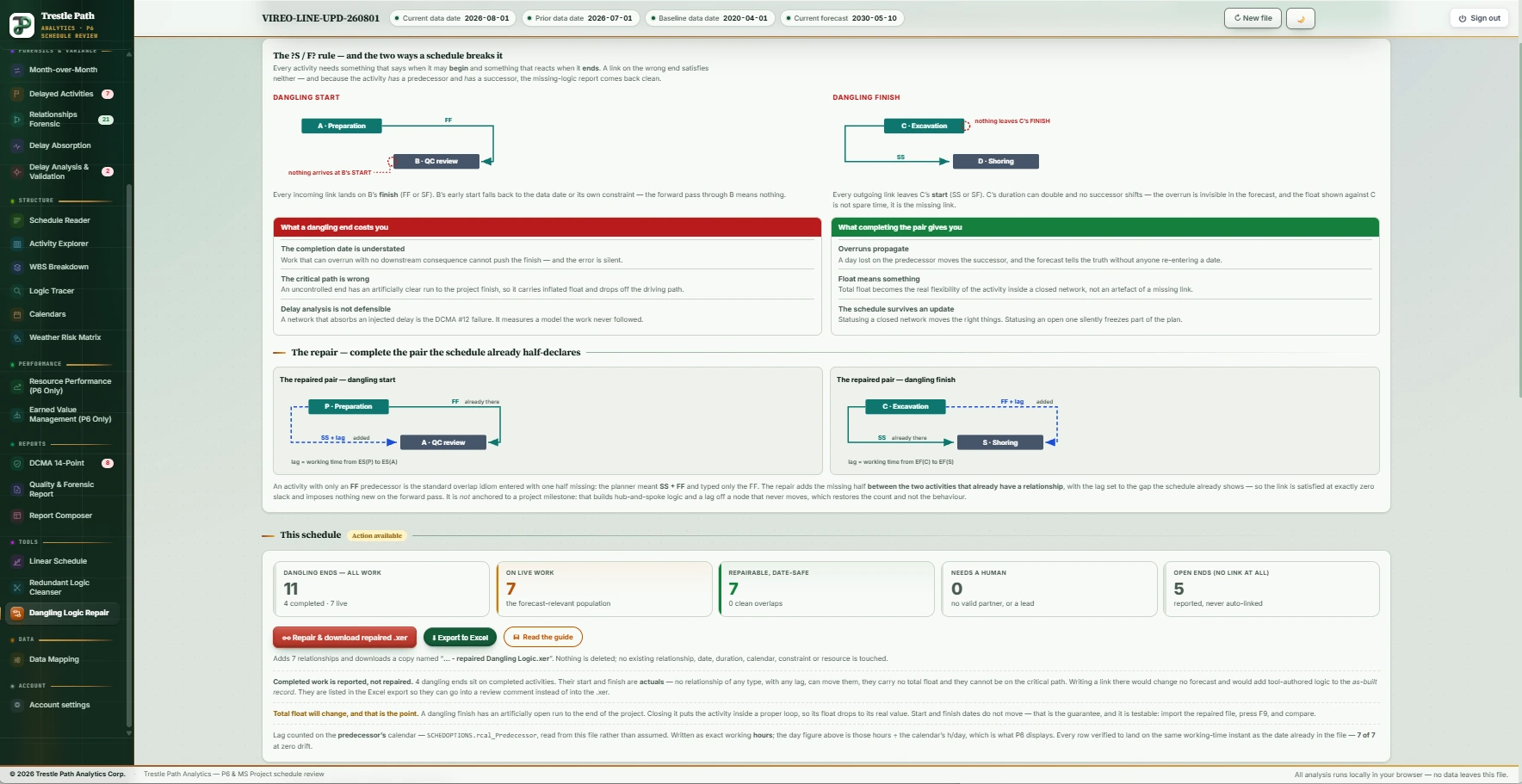
The test is the ?S / F? rule (PMI's Practice Standard for Scheduling): a start is controlled if at least one arriving relationship is FS or SS; a finish is controlled if at least one leaving relationship is FS or FF. A dangling start has incoming links, none of them FS or SS: every one lands on its finish, so its early start falls back to the data date or a constraint and the forward pass through it means nothing. A dangling finish has outgoing links, none of them FS or FF: every one leaves its start, so its duration can double and no successor shifts. An open end has no link on that end at all and is counted separately. P6's own missing-logic report cannot see a dangling end, because the activity has both a predecessor and a successor.
What it costs
- The completion date is understated. Work that can overrun with no downstream consequence cannot push the finish, and the error is silent.
- The critical path is wrong. An uncontrolled end has an artificially clear run to the project finish, carries inflated float, and drops off the driving path.
- Delay analysis is not defensible. A network that absorbs an injected delay is the DCMA check 12 failure: it measures a model the work never followed.
The repair: complete the pair
An activity whose start is uncontrolled almost always already has an FF predecessor, because the planner meant SS + FF and typed only the FF. The repair adds the missing half between the two activities that already have a relationship, with the lag set to the working-time gap the schedule already shows: for a dangling start, an SS from the existing FF predecessor with lag = working time from its early start to the activity's early start; for a dangling finish, an FF to the existing SS successor with lag = working time from early finish to early finish. The link is satisfied at exactly zero slack and imposes nothing new on the forward pass, so no date moves. It is not anchored to a project milestone, which would restore the count and not the behaviour.
The lag is counted on the calendar the file's scheduling options name (predecessor, successor or project), never assumed: the same gap of 12 to 26 May is 9 working days on a five-day calendar with a holiday and 13 on a seven-day one. Each written lag is graded by what it probably is: a clean overlap (5 working days or less), a lag to review (6 to 20), or a lag that encodes a date (longer). Every band is equally date-safe; the band answers a different question, whether the gap is a hand-off or a coincidence.
What is repaired, and what is only reported
Live work (not started or in progress) is repaired. Completed work is reported, never repaired: an actualised date cannot be moved by any relationship, a completed activity carries no float and cannot be critical, and a tool-authored link between two finished activities is a fabricated statement in the as-built record. Closing dangling ends on finished work lowers a health-check count without improving the schedule by a day. The tool also refuses to write a negative lag, to link to an activity in a retired branch or another project, to touch a milestone, or to invent a predecessor for an open end; refused rows are decisions it declines to make for you, and each says why.
Redundant logic
A leapfrog: A drives B and B drives C, so a direct A→C adds nothing. Redundancies creep in when change-order activities are inserted after the baseline is built, or when summary-level logic parallels detail-level logic. They change no calculation and they degrade the schedule as a management tool: the driving path is harder to see, what-if analysis is harder to trace, and a redundant tie is sometimes how float is sequestered.
A link is removed only when both conditions hold: it is structurally redundant (the successor is already reachable from the predecessor by another path in the start/finish network, so the same hand-off is enforced indirectly), and it is not the driving predecessor of its successor (another predecessor already imposes a later-or-equal date at that endpoint). Because the driving predecessor of every activity is always kept, the forward pass produces identical dates, verified per successor. Only zero-lag links are eligible; level-of-effort and summary activities are excluded because their dates are span-derived. A structurally redundant link that is also driving is kept, and listed as kept, because removing it would move a date.
The guarantee, and what it does not claim
For every proposed dangling repair the tool advances the predecessor's date by the lag it is about to write, on the calendar the scheduling options name, and measures the working time between where that lands and the date already stored in the file. The answer must be zero; a repair whose drift check does not pass is never written, whichever button you press. Clock equality is the wrong test (the end of the twenty-seventh working day and the start of the twenty-eighth are the same instant, and P6 stores whichever its normalisation prefers); working-time difference is the right one. What the guarantee does not claim is a CPM re-run: it is arithmetic per relationship against the dates P6 stored. The verification that settles it is yours: import the repaired file, press F9, and compare. The section's guide says what to compare and what to expect (total float will change on the repaired activities, and that is the point; start and finish dates will not).
Running it in Trestle Path Analytics
- Load the schedule from its XER. A schedule loaded from an MS Project XML is analysed and reported, but the repair buttons stay disabled: there is no P6 file to write a copy of.
- Open Dangling Logic Repair. The tiles separate the number a P6 filter would return from the number that can still hurt the forecast: all dangling ends, on completed work, on live work, repairable, refused, open ends. Read the live figure.
- Work down the table: every proposed repair is shown before anything is written, with the activity, its links, the exact relationship to be added, the lag in days and hours, the lag calendar, the quality band and the date before and after, shortest lag first. Check the refusals.
- Choose the run (all live repairs, or clean overlaps only, the conservative option when the file is going to someone else), repair, and download. The tool writes a copy of your XER with new rows appended to its relationship table and nothing else changed; each new row carries a comment naming the repair, so every addition is findable in P6.
- Open Redundant Logic Cleanser, read the removable links (each with the path that already enforces it), cleanse, and download the cleansed copy.
- Export both workbooks: they are the record of what was written or removed and why, and what you attach to a transmittal. Then import into P6, press F9, and compare.
Worked example: a demonstration metro schedule
The Vireo Line Extension is a fictional 22,200 ft twin-bore metro extension with five stations, supplied with the product as a demonstration set; nothing in it is real. This is the product's result on its August 2026 update.
| Tool | Found | Result |
|---|---|---|
| Dangling Logic Repair | 11 dangling ends: 4 on completed work, 7 on live work · 5 open ends | 7 repairs, all date-safe (7 of 7 at zero drift), 0 refused. Lags counted on the predecessor's calendar, as the file's scheduling options say. The 4 completed-work ends are listed for a review comment, not repaired. The 5 open ends are reported, never auto-linked: two are the project's start and finish, Notice to Proceed and the Revenue Service Date, which is correct, and the other three are complete. |
| Redundant Logic Cleanser | 423 relationships, 319 of them zero-lag and eligible | 14 redundant finish-to-start links removable with no date change; 1 structurally redundant link kept because it is a driving predecessor. Among the 14: the issued-for-construction tunnel lining package linked directly to all four cross-passage rounds that already follow it through the drives, and "all cross passages complete" linked directly to the tunnel handover it already reaches through the track-bed work. |
Limits
- A repaired schedule is not a good schedule. Closing dangling ends removes a defect that was distorting the forecast; it does not make the logic right, and where the lag is long it substitutes a disclosed approximation for a silent hole. The hand-offs still need modelling by the party who knows how the work is built.
- The tool never edits your file. It reads, and writes a new copy; it does not write to P6 and does not delete, retype or re-lag any existing relationship in the dangling repair.
- Repairs are written from an XER only. MS Project XML schedules are analysed and reported.
- The confirmation is your F9. The date-safety argument is arithmetic per relationship; P6 is the arbiter.
Where to find it
Dangling Logic Repair and Redundant Logic Cleanser are one module (Logic Cleanser & Dangling Repair): included in the Expert plan, available as an add-on to Reader or Analyst, and open in the fourteen-day trial. Current prices are on the pricing page.
Fourteen days free
Try it on your own schedule
Fourteen days free, no credit card, every section open. Your XER or XML file is read in your browser and never uploaded; only anonymous numbers reach the calculation service, and nothing is stored.
RelatedDCMA 14-point assessmentHow to compare two P6 updatesPlans and pricing