
What the workbook is
One click on Export the full workbook (.xlsx) builds the file from the review on screen. It reads the same analysis as every page in the product, so a count in the workbook is the count on the page it came from, and a headline in a report can be traced to the rows that produced it.
It has two modes, set by what you load. With the current schedule alone it is a quality review. With the prior update in the Prior slot it adds the period-over-period change evidence. Sheet numbers are fixed, so a sheet keeps its number in either mode, and "sheet 12" means the same thing in every workbook you issue.
Every analysis tab is laid out the same way:
- A header block. Purpose, why it matters, what to look for and the standard it rests on, folded away under the sheet title so the table starts high on the screen. The one line left open is the result: a Verdict on the quality tabs, a Summary on the change registers.
- Verdict colours. PASS (green) conforms, CAUTION (amber) needs review, FAIL (red) does not conform, FOR REVIEW (blue) is informational.
- Plain columns. A change is written out, "Later (+12 d)", "Added", "Float lost 9 d", so there is no legend to decode.
- Navigation. A frozen header row with filters, an ↑ Contents link in the top-left corner, findings that link to the tab holding their evidence, and a "Where to look next" band naming the related tabs.
The first tab, Contents, lists every sheet with a link and a count: how many entries that tab registers, in its own unit (activities, relationships, calendars), left blank on summaries and scorecards. The counts are shaded on a scale set by the busiest finding tab rather than the biggest inventory, so open ends and changed actuals stand out and a list of every calendar exception does not.
The tabs, group by group
The sections follow the questions a reviewer asks, in order. Part 1 is the quality review; Parts A to F are the change evidence.
| Group | Tabs | Count | What it answers |
|---|---|---|---|
| I · The verdict | 0 to 6, with 3a | 8 | Read Me First, the Executive Summary, the GAO reliability scorecard, the DCMA 14-Point check, missed tasks against the baseline (3a), the red-flag register, the AACE 78R-13 baseline-quality tests and the AACE 53R-06 update-review checklist |
| II · Is the logic sound? | 7 to 12 | 7 | Open ends and logic density, duplicate relationships, dangling and isolated logic, merge and burst points, redundant links, leads and lags by link type, constraints and date anchors |
| III · Is the critical path real? | 14 to 17 | 4 | The driving path in sequence with a continuity test, the float distribution, near-critical work, the float-path register |
| IV · Durations and calendars | 19 to 23a | 6 | Long and zero durations, heaping on round numbers, duration growth and the accuracy of finished estimates, every calendar and its exceptions, fractional float traced to its calendar |
| V · Is progress reported honestly? | 24 to 27 | 4 | Out-of-sequence progress, work riding the data date, progress claimed without actuals, the performance indices |
| VI · Where is the risk concentrated? | 28, 29 | 2 | Health by WBS branch, work planned into the wrong season |
| VII · What is in this file? | 30 to 30e | 6 | The inventory and what is excluded from scoring, activity types, duplicate activity and WBS names, the level-of-effort and WBS Summary register, activity-code coverage |
| VIII · Resources | 33, 34 | 2 | Where the resource load sits and every resource, typed, with its units and budget |
| IX · The two files | 31, 32 | 2 | The basis of comparison, and how the contractor executed against last month's plan |
| A · Change register | A0 to A7 | 8 | Level-of-effort and summary changes, activities added, deleted, retired and renamed, newly completed and started, and every planned start and finish of the period |
| B · Field-by-field | B1 to B10 | 8 | Date movement, at-completion duration, original and remaining durations, float, status, constraints, changed actual dates |
| C · Logic and network | C1 to C4 | 4 | Relationships added and removed, lag and type changes, each activity's rewiring |
| D · Delay and performance | D1 to D6 | 6 | Delayed activities, cumulative and this period, milestone variance, critical-path movement, float paths, near-critical changes |
| E · Structure | E2 to E5 | 4 | Calendars, their exceptions and reassignments, WBS branches, then against now |
| F · Resources | F0, F2 | 2 | Assignment changes and each resource, then against now |
With the Contents tab and the Methodology & Standards tab at the end, that is 75 tabs. Some depend on what is loaded: tab 3a needs a baseline; tabs 33 and 34 need resource assignments; tab 6, tabs 31 and 32 and all 32 tabs of Parts A to F need a prior update. A tab the loaded files cannot support is left out, and left off the Contents.
How the front page reaches its verdict
The Executive Summary opens with one word, and it is the worst verdict among the Section I scorecards (the reliability scorecard, the DCMA check, missed tasks, the red-flag register, baseline quality and update review) and the composite grade. One rule tempers it. A FAIL on the GAO scorecard, the DCMA check or missed tasks, or a failing grade, counts as CAUTION on the front page: those are general practice and questions to put to the scheduler, not acceptance criteria. What can fail the front page is a high-severity red flag or a failed AACE scorecard, where a changed historical actual or a negative-float baseline is a defect, not a discussion point.
Beneath the word, the summary says what set it, the composite grade (which measures construction quality only, not the forensic red flags), the DCMA result, the forecast movement, the critical path and the headline exposures, and, with a prior update, what changed this period. Each finding links to its evidence tab.
One schedule performance index
Tab 27 carries one schedule performance index, and only one. SPI here is earned value over planned value measured on a single resource you nominate, on the Earned Value Management page, as the project's progress weight, with the plan taken from the loaded baseline. Beside it are its time counterpart from Earned Schedule, SPI(t), and the to-complete indices TSPI and TSPI(t), which say what the remaining work now needs; all of them are on that same weight.
What the workbook does not carry is deliberate. There is no duration-weighted or cost-weighted SPI, no CPI or other cost index, and none of the contractor's stored earned value; that stored record is shown on the Earned Value Management page and in its own export. Two indices both called SPI, on different bases, on the same tab, invite the wrong one being quoted in a letter, and money is not this product's measure of progress. The Executive Summary states the cost position in money, budget, spent and remaining, and says plainly that no cost-weighted index is computed.
Until a weight resource is nominated and acknowledged, tab 27 prints no SPI. A red ACTION REQUIRED row names the page and the control that supplies it, and nothing is substituted. BEI, CPLI and TFCI sit below in their own band, labelled as time-model checks: activity counts and float, not earned value, and not comparable with SPI.
The Issue-ready pack, and the other exports
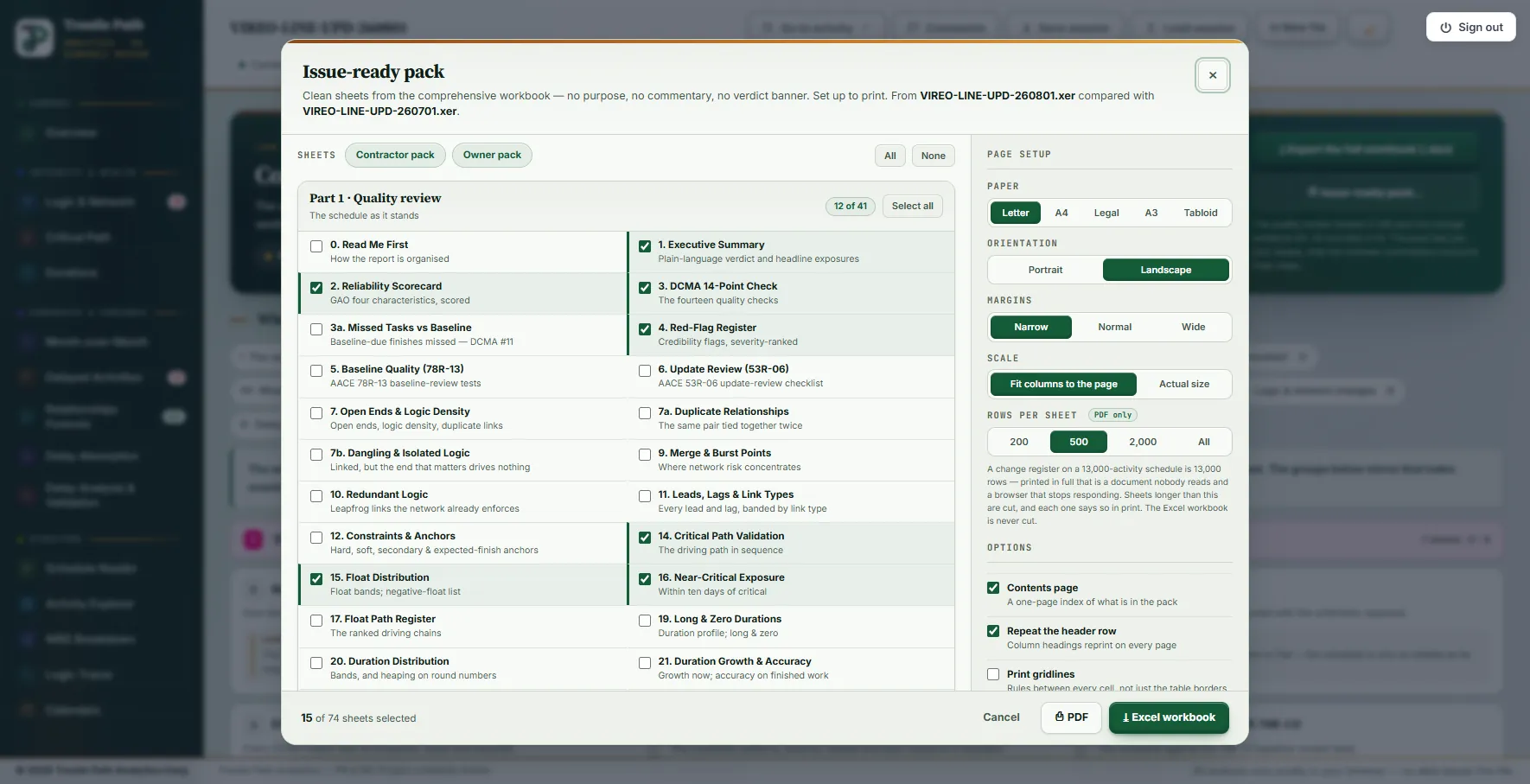
The review workbook explains itself, which is right for the reviewer and wrong for the reader of a review comment. Issue-ready pack… builds the same workbook, then keeps only the sheets you tick and strips the purpose lines, the coaching notes and the verdict banner, keeping the tables, the band headings and any note that states a basis or a result.
- Tick sheets, or press Owner pack (15 sheets: the verdict tabs, critical path and float, performance indices, WBS health and weather, the period's execution, delays, milestones and critical-path movement) or Contractor pack (16 sheets: the DCMA check, the logic, duration and statusing defects, and the constraint and logic changes).
- Set the paper (Letter, A4, Legal, A3, Tabloid), orientation, margins and scale, and whether to add a contents page, repeat header rows, print gridlines or drop the verdict colours for a document that should not look graded.
- Press Excel workbook or PDF. The sheets are renumbered 1 to N in pack order, and the cross-links follow them. A PDF cuts each sheet at a row limit you choose (200 to All) and says so in print; the Excel pack is never cut.
Each analysis page also exports its own workbook in the same style: among them the DCMA 14 (detailed), Month-over-Month, Delayed Activities, Relationships Forensic, Logic and Network Health, Critical Path, Durations, Calendars and Weather workbooks. For a written report in PDF, Word or PowerPoint, use the Report Composer.
Worked example: the workbook for a metro extension's August update
The Vireo Line Extension is a fictional twin-bore metro extension with five underground stations, supplied with the product as a demonstration set; nothing in it is real. The August 2026 update (data date 2026-08-01) was exported with the July update as the prior and the 2020 baseline. The file carries resource assignments, so every conditional tab is built: 75 tabs, 41 in Part 1 and 32 in Parts A to F.
| Tab | Verdict | What it says |
|---|---|---|
| 1 · Executive Summary | FAIL | Gated by tab 6. Composite grade C (62/100); 7 of 13 DCMA checks pass; forecast finish 2030-04-30, 78 days earlier than July's 2030-07-17; critical path of 18 activities, 100 % overlap with July's |
| 2 · Reliability Scorecard | CAUTION | Conformance Index 60/100, gated by Comprehensive (55); Well-constructed 70, Controlled 55; Credible not assessed |
| 3 · DCMA 14-Point | FAIL | 7 of 13 applicable checks pass; counted on the front page as CAUTION |
| 3a · Missed tasks | FAIL | 123 of 140 baseline-due activities missed (87.9 %): 10 still open, 113 finished late |
| 4 · Red flags | CAUTION | 0 high, 8 medium, 6 low |
| 5 · Baseline quality | FAIL | Measured on the 2020 baseline: negative float present (23), 3 open ends |
| 6 · Update review | FAIL | 1 fail and 7 to review of 16 checks; the fail is 4 previously reported actual dates changed on 2 activities |
| 14 · Critical path | PASS | 18 activities by Float Path 1; DCMA #12 passes; CPLI 1.11 |
| 27 · Performance indices | CAUTION | No SPI: no weight resource nominated. BEI 0.93, CPLI 1.11, TFCI 0.63 |
| 29 · Weather | FOR REVIEW | Location not confirmed, so no month is scored |
The change evidence counts what moved between 1 July and 1 August. Tab 31 sets the basis: 204 activities and 413 relationships in July, 210 and 419 now, one more calendar, and a critical path of 15 activities grown to 18. Tab 32 says how the month went: of the one work activity the July update planned to finish, none did; of six planned starts, one was made.
| Tab | Entries | What they are |
|---|---|---|
| A1 · Added activities | 9 | Activities present now and not in July |
| B3 · Original duration changes | 11 | Original durations rewritten on work activities |
| B5 · Total float changes | 43 | Activities whose float moved, lost or gained |
| B10 · Actual date changes | 4 | VL-NP-3140 actual start +9 d and finish +8 d; VL-FS-3140 start and finish −6 d |
| C1 · C2 · C3 · Relationships | 15 · 9 · 5 | Added, removed, and re-typed or re-lagged |
| E3a · Calendar reassignments | 6 | Activities moved onto a different calendar |
| D3 · Milestone variance | 26 | Every milestone and completion activity; Traction power energized moved +187 d |
With the progress-weight resource nominated on the Earned Value Management page (VLX_Cost, "Vireo Line Weighted Value") and the workbook exported again, tab 27 prints its one index: SPI 0.959 and SPI(t) 0.966, with 74.52 % of the approved weight earned against 77.68 % planned, 78.7 calendar days behind in earned-schedule terms, and TSPI 1.142 for the work that remains.
Limits
- A screening, not an acceptance. The DCMA and GAO measures are general practice; the thresholds are the ones set on the DCMA page, and the verdicts are questions for the reviewer, not a decision.
- Credible is not assessed. The GAO characteristic needs traceability and a schedule risk analysis, which this review does not perform; the scorecard says so rather than scoring it.
- Some tabs need an action elsewhere. No SPI without a nominated weight resource; no weather scoring until the project type and location are confirmed on the Weather Risk Matrix.
- No missing findings. If a finding cannot be calculated, the workbook is not written and the export says which; it never writes a zero in place of a result it does not have.
- MS Project XML carries no P6 activity codes, so tab 30e has nothing to measure, and from inside the file a deleted task and a partial export look the same, which tab A2 notes.
Where to find it
The Quality & Forensic Report and its workbook are included in the Analyst and Expert plans and in the fourteen-day trial. Current prices are on the pricing page. For the same review walked through page by page, see the sample review; for the fourteen checks of tab 3 one by one, see the DCMA 14-point assessment.
Fourteen days free
Try it on your own schedule
Fourteen days free, no credit card, every section open. Your XER or XML file is read in your browser and never uploaded; only anonymous numbers reach the calculation service, and nothing is stored.
RelatedA full schedule review, section by sectionDCMA 14-point assessmentHow to compare two P6 updates