
Why calendars need their own check
P6 keeps durations, lags and float in hours. It shows them as days by dividing by each calendar's Hours per Time Period, and it schedules them through the calendar's shifts, holidays and exceptions. Three review questions follow.
- Are the day counts honest? A calendar that works 10-hour shifts but is set to 8 hours per day shows an activity of ten working days as 12.5 days, and its float in fractions.
- Did dates move without an edit? Add a working Saturday to a calendar, or move an activity onto a seven-day one, and every date downstream moves while every duration and relationship reads the same.
- Is a day the same unit everywhere? Five working days on a weekend possession calendar is two and a half weeks of the wall calendar.
AACE 53R-06 counts calendar changes among the changes an update review has to find and explain. A redefinition is easy to miss, because no activity field changes.
What the page shows
Three tiles head the page: the calendars in use, with the number of definitions the export carried (past about twenty, the tile notes as a judgement, calendars stop being reviewed); the seasonal calendars; and the calendars whose hours-per-day setting does not match their shifts. Below them sits the table.
| Column | What it holds |
|---|---|
| Calendar, Scope | The calendar's name, with its ID added where two calendars share a name; Global, Project or Resource; and which one is the default. |
| Activities | Activities on the calendar, level of effort excluded. |
| Shift h/day, Set h/day, Time-unit | The longest working day the shifts define, the calendar's Hours per Time Period, and the verdict: OK, Mismatch, or Durations in another day length. |
| Days/wk, Shift h/wk, Set h/wk | Working days in the standard week, the hours the shifts work in a week, and the calendar's hours-per-week setting. |
| Hrs/month, Hrs/year | The calendar's own month and year settings, as P6 stores them. |
| Holidays/exc., Exceptions | Every exception day defined on the calendar. View lists them, the non-working days by default, searchable by date, weekday or description. |
Year at a glance draws any calendar in use for any year the schedule spans: twelve months, each day coloured working, non-working, holiday or shutdown, or working exception, with the working days counted per month and for the year. It opens on the project calendar. A working exception whose hours equal that weekday's normal pattern is drawn as an ordinary working day, so violet marks a real anomaly: weekend work or changed hours.
A calendar is identified by its ID throughout. Two calendars that share a name are two rows, and an activity's calendar is the one its calendar ID points to, never the first calendar whose name looks alike.
Hours per day, checked shift by shift
The page reads each calendar's shifts weekday by weekday, adds up the hours and takes the longest day as the calendar's real hours per day. That is compared with Hours per Time Period, to 0.01 hours. A mismatch on a calendar that carries no activity and no resource-dependent assignment is listed apart and not counted: a P6 export carries the whole calendar dictionary, and a leftover there is housekeeping, not a finding.
With every setting right, the same symptoms can still appear for other reasons, and the card under the tiles counts them:
| Check | What it counts |
|---|---|
| Calendar mismatches | Calendars in use whose shift hours differ from their hours-per-day setting. |
| Durations in another day length | A calendar set correctly whose unfinished durations look typed in another calendar's day length: at least 10 tasks, and a fifth of them, are not whole days on their own calendar, and four in five of those are whole days of another day length the file uses. Each finishes mid-shift. |
| Fractional float | Unfinished activities whose total float in hours is not a whole number of days on their calendar. |
| Cross-calendar FS | Finish-to-start links between calendars with different daily hours. |
| Mid-shift boundaries | Unfinished activities that start or finish inside the working day rather than at a shift boundary. Round-the-clock calendars are skipped. |
The Partial Float & Overlaps sheet of the Calendars workbook lists every item with its cause and a fix, and adds constraint dates set in mid-shift.
Seasonal windows and weather days
A calendar is seasonal when it holds one unbroken closure of more than 42 calendar days: a winter shutdown or an environmental work window. It carries weather days when, in two or more months, it withholds 15 per cent or more of the working days its own weekly pattern would give. A holiday shutdown, one unbroken closure of a working week or more and no longer than 42 days, is set aside before that test, so a Christmas break is not mistaken for a weather allowance. The test reads the calendar's pattern and exceptions from the data date to the last unfinished finish, at least a year ahead and at most six. A calendar's name is read only when the file carries no calendar definitions.
These are the calendars the Weather Risk Matrix treats as already carrying their weather: work in a closed season is not counted as exposure.
Calendar changes between updates
With the prior update loaded, Export to Excel adds three forensic sheets to the workbook's six (inventory, partial float and overlaps, weekly patterns, exceptions, monthly working days for the next 18 months, and incomplete activities by calendar).
| Sheet | What it reports |
|---|---|
| Calendar Changes | Each calendar in use against last month's, marked unchanged, CHANGED or NEW, with what changed: the working week weekday by weekday, the hours-per-day setting, exception days added, removed or re-timed. Each row counts the incomplete and critical activities on that calendar; calendars that have gone are listed as REMOVED. |
| Exception Changes | Every exception day added, removed or given different hours, dated and grouped by calendar. |
| Reassigned Activities | Every activity on a different calendar from last month, with both calendars, its status, original duration and total float. |
Calendars are paired with last month's by their P6 ID, and by name (then scope, then definition) where an export has re-issued the IDs, as P6 does with project calendars. Where two calendars share a name and cannot be paired, an activity on them is not reported as moved. A redefined hours-per-day setting is reported on the Calendar Changes sheet as a calendar finding; the update comparison measures lags in hours so that it does not appear as a crowd of logic edits.
A calendar review in five steps:
- Load the update and last month's update; run the review and open Calendars.
- Read the mismatch tile first. A mismatch makes every day figure on that calendar wrong.
- Read the table for what the names do not say: a seven-day week on work that was five, hours that differ from the name.
- Open Year at a glance on the calendars that carry critical work, for the months ahead.
- Export to Excel and read Calendar Changes and Reassigned Activities. Every NEW, CHANGED or moved row with critical work on it needs a sentence in the narrative.
Worked example: a new calendar under the critical path
The Vireo Line Extension is a fictional twin-bore metro extension with five underground stations, supplied with the product as a demonstration set; nothing in it is real. Its August 2026 update (data date 2026-08-01) was read with the July update as the prior. The export carries nine calendar definitions and seven are in use; the other two are global copies with [Resources] in their names, which no activity uses. Every calendar in use has its hours per day set to its shift, so the mismatch tile reads 0.
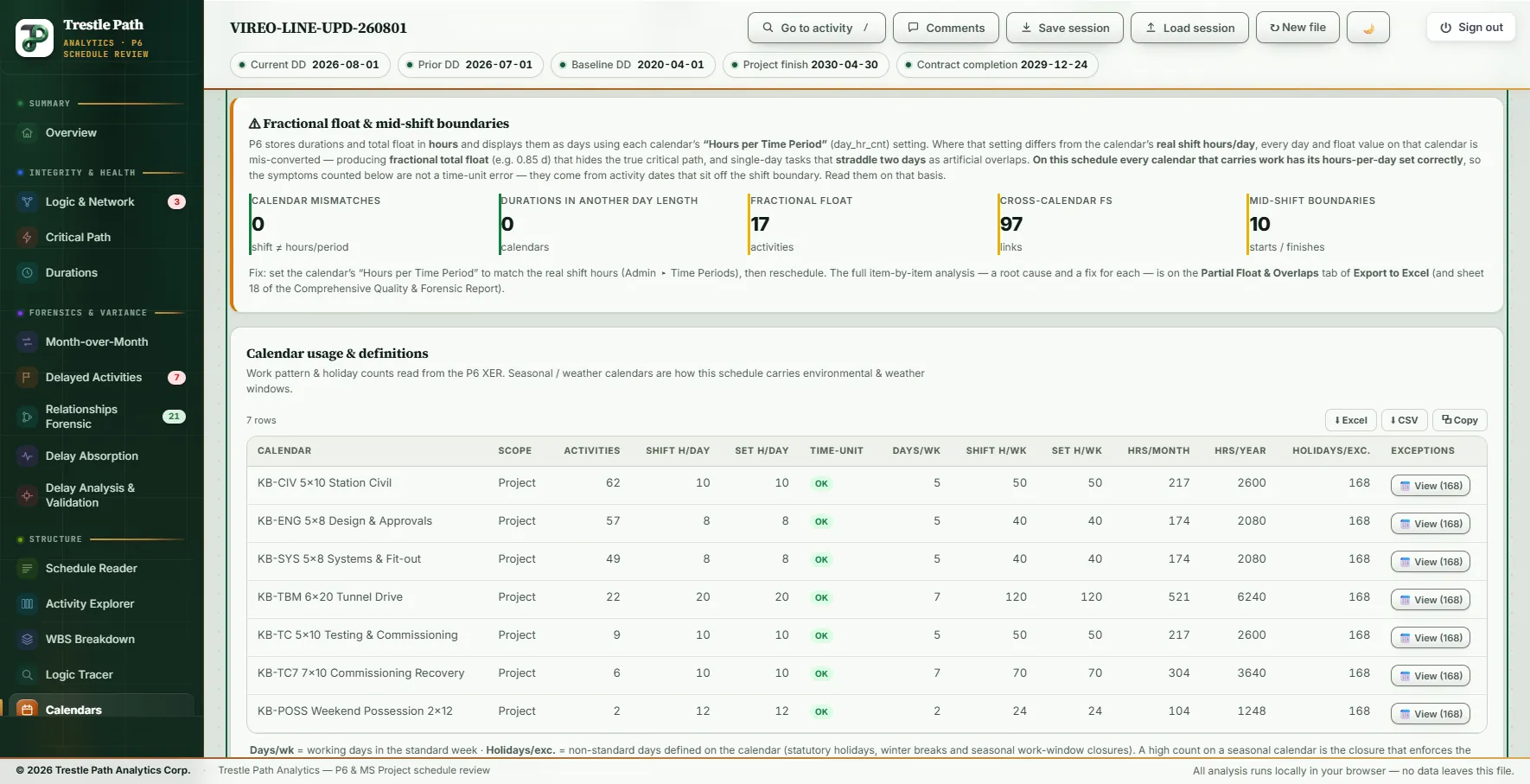
| Calendar | Activities | Shift h/day | Days/wk | Shift h/wk | Working days in 2026 |
|---|---|---|---|---|---|
| KB-CIV 5x10 Station Civil | 62 | 10 | 5 | 50 | 250 |
| KB-ENG 5x8 Design & Approvals (project calendar) | 57 | 8 | 5 | 40 | 250 |
| KB-SYS 5x8 Systems & Fit-out | 49 | 8 | 5 | 40 | 250 |
| KB-TBM 6x20 Tunnel Drive | 22 | 20 | 7 | 120 | 353 |
| KB-TC 5x10 Testing & Commissioning | 9 | 10 | 5 | 50 | 250 |
| KB-TC7 7x10 Commissioning Recovery | 6 | 10 | 7 | 70 | 353 |
| KB-POSS Weekend Possession 2x12 | 2 | 12 | 2 | 24 | 103 |
What the table says that the names do not
The tunnel drive calendar is named for six days of 20 hours, and the page counts seven. Its night shift runs from 22:00 to 02:00, so Saturday's shift ends two hours into Sunday: the Weekly Patterns sheet reads Sunday 2 h, Monday 18 h and Tuesday to Saturday 20 h, still 120 hours a week. Each calendar carries 168 exception days, twelve non-working days a year from 2018 to 2031; on the five-day calendars 11 of 2026's twelve fall on weekdays, leaving 250 working days, 18 of them in November. No calendar closes for more than six weeks; on the five-day calendars the longest closure ahead is four days, 26 to 29 November 2026. The Seasonal tile reads 0, and notes that on linear infrastructure that is worth a question.
The time-unit card
Seventeen activities carry fractional float, nine of them on the critical path. Eight critical testing activities show 1.5 hours of total float, 0.15 of a 10-hour day, which a whole-day display rounds to zero; the critical path guide traces where those hours come from. The tunnel invert, VL-TF-4400, carries 25 hours on its 20-hour calendar: 1.25 days. Ninety-seven finish-to-start links cross calendars with different daily hours, nine of them into critical activities. The ten mid-shift boundaries are five track activities on the station civil calendar that start and finish at 08:00, an hour into a shift that begins at 07:00.
The calendar that is new this month
The workbook's Calendar Changes sheet marks six calendars unchanged and one NEW: KB-TC7 7x10 Commissioning Recovery, absent from July, carrying 6 incomplete activities, 5 of them on the critical path. Exception Changes is empty: no holiday was added or removed anywhere. Reassigned Activities lists the six (VL-TC-7020, 7030, 7040, 7050, 7070 and 7100), each moved from KB-TC 5x10 Testing & Commissioning. The hours per day are the same, so nothing was rescaled; the week went from 50 hours to 70, and Year at a glance counts 353 working days in 2029, when the testing runs, against 250 on the calendar they left. The same update also shortened their original durations, VL-TC-7050 from 85 days to 76, so two changes act on the same chain.
Limits
- It reads, it never edits. A fix is a comment to the scheduler, made in P6.
- The change sheets need the prior update. They are in the Excel workbook, not on the page.
- One figure per calendar. Hours per day is the longest day's shifts, so a calendar with a short Friday is checked against its longest day.
- Fixed thresholds. The 42-day seasonal limit, the 15 per cent weather-day test and the day-length test are judgement, not a standard's rule. Whether a calendar's allowance matches the contract's adverse-weather table is a question for the Weather Risk Matrix.
- Microsoft Project XML. Each calendar's shifts are checked against the project's single Minutes per Day, which is how MS Project converts days; there is no resource-dependent calendar switch to consider.
- Descriptions. Exception days show a description only when the file carries one; the demonstration set carries none.
Where to find it
The Calendars page is included in every plan, from Reader up, and in the fourteen-day trial. Current prices are on the pricing page. For how calendars of different lengths shape the critical path, see critical path, longest path and float paths; for the calendar register beside every other change between two updates, see how to compare two P6 updates.
Fourteen days free
Try it on your own schedule
Fourteen days free, no credit card, every section open. Your XER or XML file is read in your browser and never uploaded; only anonymous numbers reach the calculation service, and nothing is stored.
RelatedCritical path, longest path and float pathsHow to compare two P6 updatesSeasonal weather risk in a P6 schedule