
Four questions, in the order a reviewer asks them
| Question | What answers it |
|---|---|
| 1. Are these durations credible? | The estimating factor on finished work, the share within 20 per cent of plan, the work that ran over 120 or under 80 per cent, round-number durations and the heaping chart |
| 2. What changed since the prior update? | Original durations changed, changed on completed work, shortened and lengthened on unfinished work, and the change register |
| 3. Is the status honest? | Statusing errors, duration growth, Expected Finish dates, work open for more than 60 days, zero-duration tasks, and actual dates that enclose no working time |
| 4. Which durations are too big to manage? | Original duration over 44 days, remaining duration over one 20-day reporting cycle, one-day tasks, the distribution and where the long durations sit by WBS branch |
The population for questions 3 and 4 is the unfinished tasks: not level of effort, not milestones, carrying an original duration. Activities under a retired WBS branch are left out, as everywhere in the review. No metric sits under two questions, and every count opens its list, under a "You clicked" bar on the page. Export to Excel writes the section as a workbook in the page's order: a cover, a read-me, a summary and twelve numbered sheets, each register carrying the calendar and its hours per day beside every duration.
Whose days: the calendar rules behind every figure
A day is not a fixed quantity of work. It is one working day on whichever calendar the activity is assigned to, and the page is built on that.
- Day figures are P6's. P6 stores every duration in hours and shows days as hours divided by the calendar's hours-per-day setting. The page divides the same way, as P6 does for its day columns. The header states the mix across the unfinished tasks, and each register prints the calendar beside the duration.
- Actual duration is working time. For the estimating test, actual duration is the working time between the actual start and the actual finish on the activity's own calendar, found by its calendar ID, divided by that calendar's hours per day: P6's Actual Duration. A finished activity whose actual dates enclose no working time is not scored, and is reported.
- Changes are found in stored hours. Question 2 compares the hours P6 stores, not the day figures. Re-defining a calendar's hours per day changes every day figure on it without anyone touching a duration, and is not reported as a re-plan; cutting the hours is. The results are shown in days.
- At completion is a span. For duration growth, at completion is the working time from the actual start to the remaining early finish on the activity's own calendar, as P6 prints it, never less than actual plus remaining.
- Settings that disagree with shifts are listed. The workbook's Calendar Effects sheet lists any calendar whose hours-per-day setting differs from its real shift hours, because on such a calendar a displayed day is not a working day.
Are the durations credible?
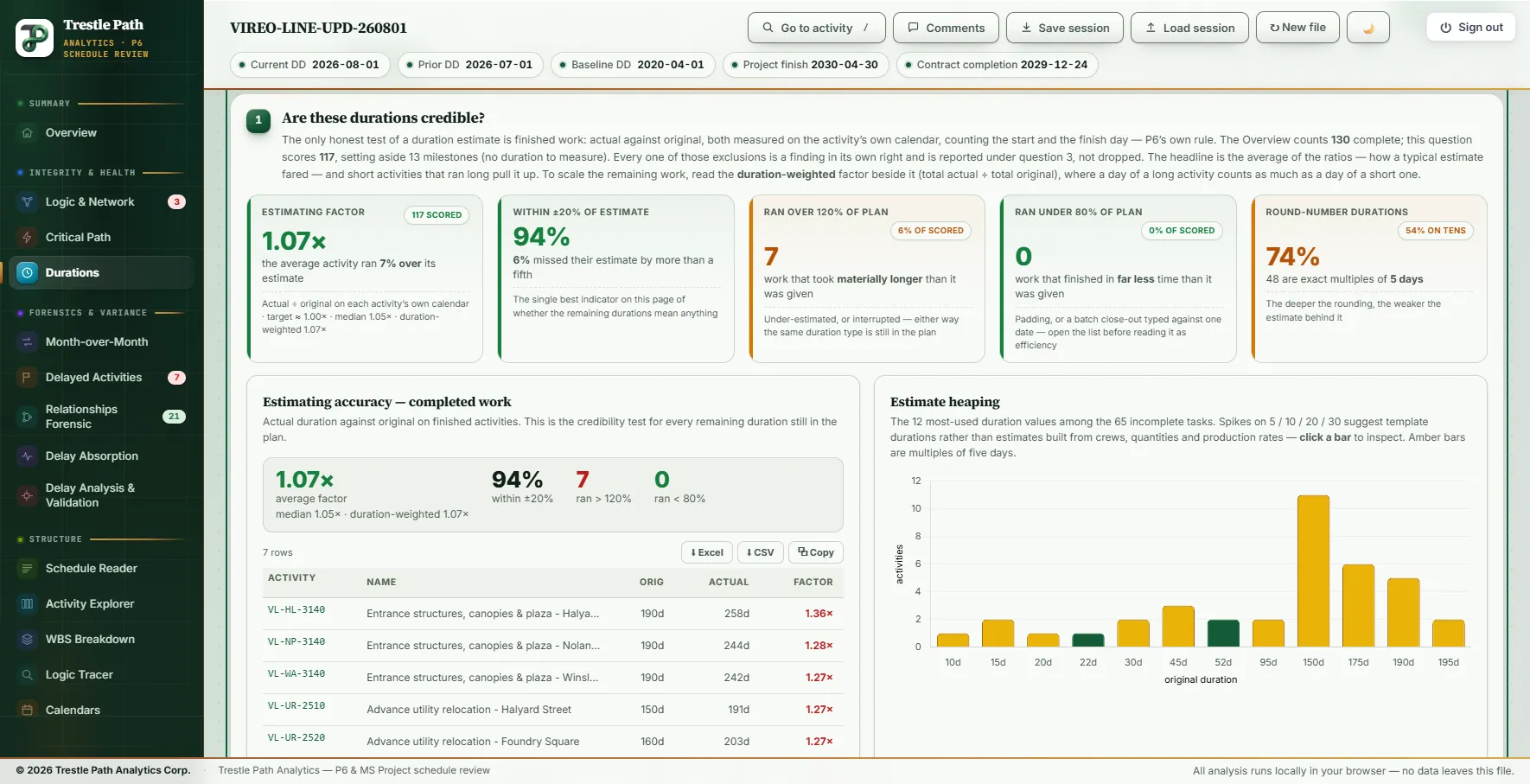
The only honest test of an estimate is finished work. The section takes every completed task with both actual dates and an original duration, divides actual by original, and reports the factor, the share within a fifth of plan, and the misses each way. The band says how many completed activities were set aside and why: milestones, missing actual dates, no original duration, or actuals with no working time.
- Estimating factor. The average of the ratios: how a typical estimate fared. Beside it, the median and the duration-weighted factor (total actual ÷ total original), which is the one to scale remaining work by, because short activities that ran long pull an average of ratios up. The tile is green to 1.10×, amber above, red above 1.25×.
- Within ±20 per cent. The share of scored work that finished between 0.80 and 1.20 of plan: green from 60 per cent, amber from 40.
- Over 120 and under 80 per cent. Both misses are findings. A duration that finished in a third of its plan was the same estimate as one that doubled, wrong the other way, and is usually padding or a batch close-out rather than efficiency.
- Round-number durations are read on the work still to come: the unfinished tasks whose original duration is five days or more and an exact multiple of five. The tile turns amber at 35 per cent; its chip gives the share of those on multiples of ten. The heaping chart shows the twelve most-used values, multiples of five in amber; click a bar to list its activities. Spikes suggest template durations rather than estimates built from crews, quantities and production rates.
What changed since the prior update?
Original duration is the plan. A Compare against switch sets the reference: Prior update answers what was re-planned this period, the update-review question of AACE 53R-06; Baseline answers every original-duration edit since the plan was agreed. Question 2, its registers and its export follow the switch; questions 1, 3 and 4 are facts of the current schedule and do not.
- Changed on completed work leads the register. The original duration of a finished activity is the plan its actual is scored against, so changing it rewrites the estimating record. A batch that all moves by the same amount is one global change, not a set of estimating decisions: ask which, in writing.
- Shortened, not complete is compression. On work that has not started, it absorbs delay inside the plan instead of reporting it.
- Lengthened, not complete should come with a narrative for each one.
Load the prior update or the baseline beside the current schedule to answer this question; with one file the tiles say what is missing. For every other change between two updates (dates, logic, calendars, float), see how to compare two P6 updates.
Is the status honest?
Remaining duration is the schedule's statement of how much work is left. These checks ask whether it still means that.
- Statusing errors count three failures with one consequence: in progress with remaining duration at or above the original (nothing earned since it started), in progress at zero remaining but not complete (it will never finish on its own), and not started with remaining different from original (pre-statused or stale).
- Duration growth lists started work whose at-completion duration now exceeds the original by more than half a day. The activity grew mid-flight, and the slip was absorbed without a logic change, which is why it never appears in a logic-change register.
- Expected Finish set lists activities whose remaining duration P6 back-calculates from a typed date. For these, remaining duration is not an estimate and the other checks do not apply.
- Open over 60 days lists work in progress that started more than 60 calendar days before the data date: long-running work hides its own slippage between updates.
- Zero-duration non-milestones, unfinished or finished, and actuals with no working time get tiles when the file has any.
Too big to manage, or too small
Two size tests read two different fields, and they overlap. Long durations are original durations over 44 days, the DCMA high-duration limit, which follows any limits set on the DCMA section; they are the first candidates for a breakdown request, once you have checked they are not permit allowances or float containers. Longer than one cycle is remaining duration over 20 working days, the product's convention for a monthly reporting cycle: an activity you cannot see change between two updates has a per cent complete that is an opinion. The band states how many fail both, each alone, and the union, so the two counts are never added.
The opposite fault is counted too: one-day tasks, churn to status every month without adding visibility. A distribution chart bands the unfinished tasks by original duration, and a WBS chart shows the average original duration per top branch, which is where a breakdown request buys the most visibility. The DCMA compliance test on long durations, check 8, stays with the DCMA 14-Point section, which counts the same population.
Worked example: a metro extension's August update
The Vireo Line Extension is a fictional twin-bore metro extension with five underground stations, supplied with the product as a demonstration set; nothing in it is real. This is the section on its August 2026 update (data date 2026-08-01), with the July update as the prior and the 2020 baseline loaded. It holds 65 unfinished tasks: 65% on 8-hour days, 29% on 10, 3% on 12 and 3% on a 20-hour tunnelling calendar. No calendar's hours-per-day setting differs from its shift hours, so every displayed day is a working day.
| Check | Measured | What to make of it |
|---|---|---|
| Estimating factor | 1.07× · median 1.05× · weighted 1.07× | Good. 117 of 130 completed activities scored; the other 13 are milestones. |
| Within ±20% | 94% | Good. |
| Over 120% · under 80% | 7 · 0 | Amber. Entrance structures, canopies and plaza at four stations (1.23× to 1.36×) and advance utility relocation at three (1.25× to 1.27×). |
| Round-number durations | 74% · 48 of 65 | Amber. 54% of them on multiples of ten. 150 days is used 11 times, 175 days six and 190 days five. |
| Changed since July | 11 · 0 on completed work | Red. Nine shortened, all not started, all testing activities, by 3 to 9 days; six are on the critical path. Two lengthened (amber): communications site acceptance test, 85 to 123 d (+38 d), and switchgear, rectifier and transformer installation, 140 to 157 d (+17 d). |
| Changed since the baseline | 35 · 20 on completed work | Red. All 20 finished activities read one day shorter, every one on the KB-TBM 6x20 Tunnel Drive calendar of 20 hours a day: TBM assembly and commissioning, every drive of both bores, both retrievals and the four cross-passage packages. In stored hours each lost 12 to 18. |
| Statusing errors | 1 | Red. The Rookery Point elevators and escalators (VL-RP-3150): not started in July with 150 d remaining, started on 2026-07-23, and now 185 d remaining against an original of 150 d. |
| Duration growth | 14 · 22% of unfinished | Amber. The same elevators lead, 240 d at completion against 150 d (+90 d). Two are on the critical path: tunnel M&E containment, cable tray and lighting (+47 d) and the tunnel invert, walkway and drainage (+9 d). |
| Expected Finish · open over 60 days | 0 · 13 | The station rough-in and finishes packages, the cross-passage linings and two tunnel fit-out activities, all in progress since before 2026-06-02. |
| Long durations · over one cycle | 52 · 60 | Amber, both. 51 fail both, 1 only the first, 9 only the second: 61 in all, not 112. The DCMA section's check 8 reads the same 52 of 65. |
| One-day tasks · median | 0 · 125 d | Mean 108 d; the longest is wayside signalling installation at 220 d. |
Five of the nine shortened testing activities also moved this month, from the KB-TC 5x10 Testing & Commissioning calendar to KB-TC7 7x10 Commissioning Recovery. Both are set at ten hours a day, so the change register is not reacting to a calendar: the stored hours were cut, systems integration testing (VL-TC-7050) from 850 to 760.
Limits
- Accuracy needs history. The estimating factor scores only finished tasks with both actual dates. Early in a job it rests on a few activities, and it says how past estimates fared, not that the remaining ones are right.
- The thresholds are conventions. The 20-day cycle, the ±20 per cent band, 60 days open and the 35 per cent heaping flag are this review's judgements; 44 days is the DCMA default. None is a contract term.
- Question 2 needs a second file. With only the current schedule loaded, the change tiles are empty and say so.
- A day figure is a calendar's day. Durations on different calendars are not the same quantity of work; read the calendar column with every register.
- MS Project XML is read the same way, on Project's own durations and calendars; the prior update or baseline must be a Project file too.
Where to find it
Duration Analysis is included in every plan, from Reader up, and in the fourteen-day trial. Current prices are on the pricing page. The page carries its own reading guide, How to read this page, at the foot. For what else changed between two updates, see how to compare two P6 updates; for the fourteen DCMA checks, see the DCMA 14-point assessment.
Fourteen days free
Try it on your own schedule
Fourteen days free, no credit card, every section open. Your XER or XML file is read in your browser and never uploaded; only anonymous numbers reach the calculation service, and nothing is stored.
RelatedHow to compare two P6 updatesDCMA 14-point assessment