
What an XER file is
An XER is Primavera P6's native exchange format: a tab-separated text file with one table per kind of record (PROJECT, TASK, TASKPRED for relationships, CALENDAR, PROJWBS, RSRC and TASKRSRC for resources and assignments, ACTVCODE and UDFVALUE for codes and user fields, and more). It carries everything P6 needs to rebuild the project, including the early, late and actual dates and the float P6 calculated when the file was last scheduled, and P6's own flags for the critical and longest path.
Two consequences matter to a reader. First, the file is complete: nothing about the schedule is hidden from a tool that reads every table. Second, the dates in it are stored, not recomputed: a file exported before the project was re-scheduled shows the previous run's dates, and a viewer that only displays what is stored cannot tell you that.
What a viewer shows, and what a review adds
| A viewer shows | A review adds |
|---|---|
| Activities, WBS, dates, durations, float and relationships as stored in the file, on a Gantt | The same figures recomputed from the logic and calendars, so a stale or re-flagged file is caught |
| P6's critical and longest-path flags | The critical path derived from the network: the longest path, with Float Path 1 as the critical path, matched to P6's own method |
| Last month's file beside this one, if you open both | Every difference between them, by register: scope, logic, durations, calendars, constraints, progress, float (how to compare two updates) |
| Calendars by name | Every calendar checked shift by shift, and every activity that moved between calendars |
| — | The DCMA 14-point counts, the logic and network health checks, the delay analysis, the evidence workbook |
Reading an XER in Trestle Path Analytics
- Start the trial or sign in. No installation; it runs in a current browser on a desktop or laptop.
- Load the XER (or an MS Project XML) as the current schedule. Load last month's update as the prior file if you want baseline bars and variance beside the current dates.
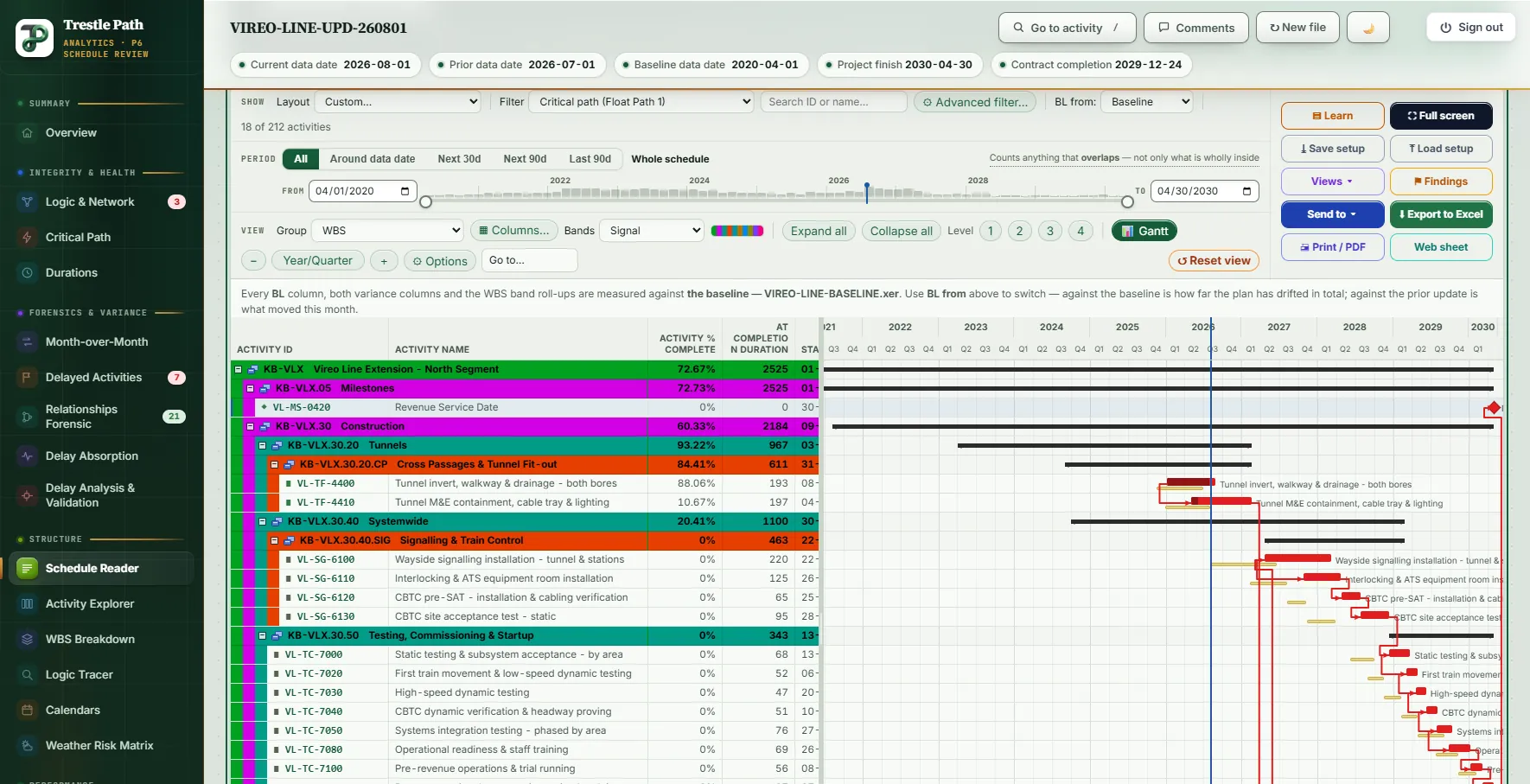
- Open Schedule Reader. The schedule appears as P6 shows it: WBS bands, a row-aligned Gantt with baseline and float bars, columns you can drag and drop, filters, full screen.
- Use the views built for reading: WBS Breakdown, Activity Explorer (12 saved layouts, 19 filters, 29 columns) and Logic Tracer, which walks the driving chain hop by hop from any activity.
- Open Critical Path & Float to see what drives the finish date, and Data Mapping to see what the file contained, what was carried into the review, and what was held out and why.
- Export what you are looking at to Excel.
Where the file goes
The XER is read by code running in your browser. It is never uploaded, and its name never leaves your computer. To calculate a review (float paths, comparisons, delay measurements), the browser sends the calculation service only the numbers those calculations need, with every activity, relationship, calendar and resource replaced by a random code made up in your browser for that one calculation; names, codes, notes, costs and file names are never sent, and nothing is stored. The check of every request a full review sends is published as a worked example in the privacy notice.
Limits
- It reads; it does not edit. Trestle Path is a review tool. It writes a cleansed XER in one case (the Redundant Logic Cleanser), and otherwise never changes the file.
- Very large files (tens of thousands of activities) take longer to parse in a browser than in P6; the page reports progress while it works.
- MS Project XML carries less than an XER: no activity types, resource curves or activity codes, and a simpler calendar model. What is missing is stated on the pages that need it.
- Global data (enterprise codes, global calendars) is read as exported in the file; anything P6 did not export is not there to read.
The Reader plan
The Reader plan (USD 15 a month, or 150 a year) includes Schedule Reader, Critical Path & Float, WBS Breakdown, Activity Explorer, Logic Tracer, Duration Analysis, Calendars and Data Mapping, with last month's update loaded as the baseline and Excel export of what you are looking at. The comparison registers, DCMA assessment and delay analysis are in the Analyst and Expert plans. The fourteen-day trial opens everything. Current prices are on the pricing page.
Fourteen days free
Try it on your own schedule
Fourteen days free, no credit card, every section open. Your XER or XML file is read in your browser and never uploaded; only anonymous numbers reach the calculation service, and nothing is stored.
RelatedHow to compare two P6 updatesDCMA 14-point assessmentPlans and pricing