
What the page counts
Every number in the top row counts the same thing: a predecessor-to-successor relationship, one link. That is the unit P6 stores and the unit the product's workbooks print, so a tile, its register and the comprehensive report reconcile row for row.
| Tile | What it counts | How to read it |
|---|---|---|
| Relationships added | Links in the current update with no counterpart in the reference, with how many touch the critical path and how many pairs of activities became connected | A new link changes what an activity waits for. A fragnet arrives as a run of added links. |
| Relationships removed | Links in the reference with no counterpart now, counted the same way | Removing driving logic is how a slip can be made to disappear. Start with the ones on the path. |
| Retyped or re-lagged | Links kept on the same pair whose type or lag was edited | These move dates without adding or removing a link, and they are easy to miss in P6. |
| Net change | Added minus removed, beside the links in the current network | A net near zero with large counts on both sides is a re-wire, not a refinement. |
| Activities affected | Activities in both updates with a link added, removed or edited, as a share of the work activities | Amber above 5 per cent, a review judgement printed on the tile: AACE 53R-06 asks that logic changes be explained and sets no figure. |
The tiles are slate, not red or green: an edit is not a fault, and a schedule whose logic never changes has usually stopped being maintained. The arithmetic is closed: added minus removed equals the change in the number of links between the two files. A pair is not a relationship, because P6 allows one link of each type between two activities and a start-to-start with a finish-to-finish is the ordinary way to model an overlap; the pair count sits beneath the headline as a second question, not the first.
Below the tiles, a banner names the changed activities on the current critical path (Float Path 1, the path every page uses) and those within 10 days of float off it, each a chip that opens the activity. Then the table, one row per changed activity: float now and in the reference, the finish and how far it moved, and Pred Δ and Succ Δ, which count link ends on that activity. One relationship appears at both of its ends, so those columns do not sum to the tiles, and the page says so.
How a link is matched across two updates
- Activities by Activity ID (the Unique ID for MS Project). Only activities present in both files can be compared link by link. A link that arrived or left with a new or deleted activity is still in the counts.
- A relationship is predecessor, successor and type. That is P6's own key: at most one link of each type between two activities. Adding a finish-to-finish to a pair that already carries a start-to-start is one link added; the start-to-start is left alone. Same pair, same type, different lag is re-lagged.
- A retype is inferred, never assumed. Where exactly one link on a pair disappeared and exactly one of another type appeared, they are reported as one retyped relationship, old and new type and lag side by side. Two additions against one removal stay two additions and one removal: picking which one is "the same" link would be inventing a fact.
- Lag is compared in hours. P6 stores a lag in hours; the day figure is those hours divided by the calendar's hours per day. Redefine a calendar's day length and every lag on it reads differently without anyone touching a link, so comparing days would report phantom edits. The page still shows days, as P6 does, with the hours in the tooltip and the workbook; where the hours held and the day figure moved, the lag cell says "was …d · calendar".
- Calendars are identified by id. Each activity's calendar is the one its calendar id points to in its own file; across the two updates calendars are paired by id, and by name only where the export re-issued the id. The workbook's Read me counts any calendar whose hours per day changed between the two files and points to the Calendars workbook.
Where a link's partner exists in only one file, the side-by-side view says which case it is: NEW (added this period), DELETED (the code is gone from the current file) or RETIRED (still in the file, moved into a retired or inactive WBS branch and so out of every count). Deleted work and parked work are different questions for a contractor.
Reading one activity side by side
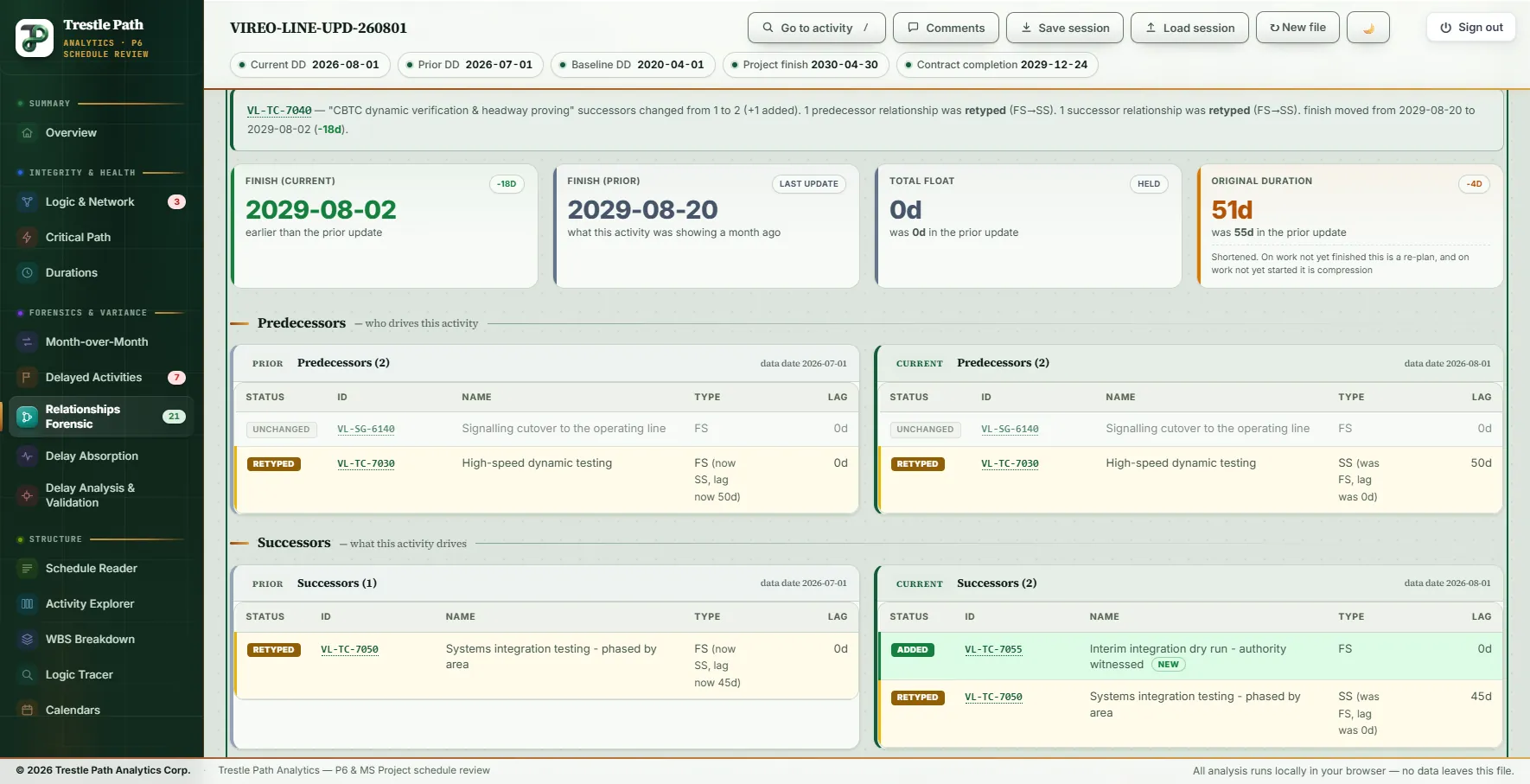
Click a row, or a chip in the banner, and the activity opens beneath the table. A sentence says what happened: predecessors and successors before and after, which links were retyped (FS→SS) or re-lagged, how far the finish moved and how the float changed. Four tiles follow: the finish now, the finish in the reference, total float and original duration. A changed duration is amber either way, since on work not yet started a shorter one is compression; float that appears from nowhere is flagged, because it usually means a driving link was removed.
Then the logic, twice: Predecessors (who drives this activity) and Successors (what it drives), the reference on the left with its data date and the current update on the right. Every link is a row tagged UNCHANGED, ADDED, REMOVED, RETYPED or RE-LAGGED, and a retyped row says what it was: "SS (was FS, lag was 0d)". Unchanged links stay on screen because what stayed put is the context for what moved. Every Activity ID opens the activity's details, including a removed partner that now exists only in the prior file.
Prior update or baseline
When a baseline is loaded, a Compare against switch sits at the top. Against the prior update the page reads as one month of rewiring, the review an update deserves under AACE 53R-06. Against the baseline it is every logic change since the plan was agreed, the register an entitlement claim is built from. The tiles, banner, table, side-by-side wording ("was 55d in the baseline") and workbook all follow the switch.
The switch keeps your place: the selected activity, the search and the sort survive it. If that activity has no change against the other reference, the page says so rather than going blank, which tells you the rewiring happened in the other period. With no baseline loaded there is no switch, and Save session keeps the choice with the rest of the review.
Running it
- Load this month's export as the current update, last month's as the prior, and the baseline if you have it. Press Run.
- Open Relationships Forensic under Forensics & variance. The badge on the menu is the number of activities affected.
- Read the five tiles, then the banner: the changed activities on the critical path come first.
- Click an activity and read its logic side by side. Sort the table by ΔFin to bring the large finish movements to the top.
- Switch to Baseline to see whether an edit is new this month or part of a longer drift.
- Press Export to Excel and work the register.
Worked example: a metro schedule's August update
The Vireo Line Extension is a fictional 22,200 ft twin-bore metro extension with five underground stations, built as a demonstration set of a baseline and monthly P6 updates; nothing in it is real. This is the page on the August 2026 update (data date 2026-08-01) against the July 2026 update (2026-07-01), with the 2020 baseline loaded.
The tiles: 15 relationships added (5 on the critical path), 9 removed (1 on the path), 5 retyped or re-lagged (4 on the path), a net change of +6 on a network of 419 links. No changed pair carries a second link, so the pair counts are also 15 and 9. 21 activities are affected, 10.1 per cent of the 207 work activities and over the 5 per cent line; 6 of them are on the current critical path. The 29 changes fall into seven groups:
| Where | Relationships | What changed |
|---|---|---|
| Ahead of wayside signalling (critical path) | 4 added · 1 removed | The FS from tunnel M&E containment (VL-TF-4410) to wayside signalling installation (VL-SG-6100) is gone. In its place runs a three-activity delay fragnet, Impact 11. Wayside signalling's finish moved from 2027-12-29 to 2028-03-06, +68 d. |
| Testing chain (critical path) | 4 retyped | Four FS links with no lag are now SS 45, 50, 45 and 80 d (450, 500, 450 and 800 h), from low-speed dynamic testing through to the witnessed acceptance test. Systems integration testing's finish moved 69 days earlier, the acceptance test's 64. |
| Interim dry run | 2 added | A new authority-witnessed integration dry run (VL-TC-7055) ahead of the emergency ventilation demonstration, whose finish moved +182 d and whose float fell from 154 d to 10 d. |
| Traction power | 3 added · 1 removed | An SS 60 d link from switchgear installation to the permanent power connection replaced by a second fragnet, Impact 12. The connection moved +198 d; its float fell from 103 d to 11 d. |
| Trackwork | 2 added · 5 removed | Impact 13 tied in with an SS and an FF. Five links left with the Nolan Park floating slab (deleted) and the north crossover special trackwork (moved into a retired WBS branch, so badged RETIRED). |
| Communications | 2 added · 2 removed | Public-safety radio deleted with its two links; a second-shift recovery package added, SS 120 d after SCADA installation and FS into the site acceptance test. |
| Stations | 2 added · 1 re-lagged | Temporary platform access added at Rookery Point. At Halyard Street the SS from MEP rough-in to finishes went from 110 d to 80 d (880 h to 640 h): same link, same type, re-lagged. |
The figure shows the testing compression on one activity. CBTC dynamic verification's link from high-speed testing and its link to integration testing were both finish-to-start in July; in August both are start-to-start, with lags of 50 d and 45 d. A new successor follows it, its original duration went from 55 d to 51 d and its finish moved from 2029-08-20 to 2029-08-02. The same update moved the four activities at the head of the retyped links onto a seven-day, ten-hour commissioning calendar that did not exist in July. A new calendar is not a redefined one: no calendar's hours per day changed between the two files, so none of the 29 is a calendar artefact.
Switched to the baseline, the counts do not change: 15, 9 and 5 again. The July update carries the 2020 baseline's network unchanged, every relationship with the same type and lag in hours, so August is the first update since the plan was agreed to rewire the logic. The finishes do change: against the baseline, CBTC dynamic verification is 98 days later, not 18 days earlier.
The workbook
Export to Excel writes the comparison the page is showing, against the prior update or the baseline: four sheets, plus a fifth when an activity is open on screen.
| Sheet | What it holds |
|---|---|
| Read me | The reconciliation in one unit, where to start, how "changed" is decided, why hours, and whether a calendar was redefined |
| Relationship Changes | One row per changed relationship: the change; Scope (re-sequencing, new activity or deleted activity); Still governing? (both ends ahead, only the successor ahead, out of sequence, or both complete); on the critical path or not; how far the successor's finish moved; both activities and their status; type; lag in days and hours; what it was; and an empty column for your comment |
| Activities Affected | The same changes per activity, critical and near-critical first, with float and finish against the reference |
| New & Deleted | Activities in only one update, with the links they brought in or took out |
| Selected Activity | The open activity in full: dates, float, durations, calendar on both sides and every link |
The register opens on the critical path, then re-sequencing that can still move a date, then the rest, each by the size of the successor's movement. On the Vireo August update, 10 of the 29 changes touch the critical path; 7 re-sequence work present in both updates and still govern it; 22 arrived or left with a new or deleted activity, which is scope being detailed rather than the network rewired; none sits between two completed activities.
Limits
- It reports edits, not causes. The successor's finish movement ranks candidates. Proving that a link drove a date needs free float on the link, which an XER does not carry.
- It matches by Activity ID. Renumbered activities read as deletions and additions; the review warns when the two files share too few IDs.
- Relationships only. Durations, dates, progress, calendars and constraints are on Month-over-Month, Durations and Calendars.
- Conventions, not thresholds. The 5 per cent line and the 10-day near-critical band are review conventions, not contract limits.
- MS Project XML. Tasks are matched on Unique ID, and elapsed or percentage lags are compared by what Project stored. A P6 XER cannot be compared with an MS Project XML; the review refuses a mixed pair.
Where to find it
Relationships Forensic is included in the Analyst and Expert plans and in the fourteen-day trial. Current prices are on the pricing page. For everything else that changed between the two updates (dates, progress, durations, calendars, constraints and scope), see how to compare two P6 updates; for repairing logic rather than reviewing its changes, see dangling and redundant logic in P6.
Fourteen days free
Try it on your own schedule
Fourteen days free, no credit card, every section open. Your XER or XML file is read in your browser and never uploaded; only anonymous numbers reach the calculation service, and nothing is stored.
RelatedHow to compare two P6 updatesDangling and redundant logic in P6