
What the page lists
Everything still behind at the data date, not just this month's misses. An activity stays on the list every update until it is actually finished, however long ago it fell due; the count falls when work closes out, not when a new forecast date is typed in. A count that holds steady while the slip grows is a backlog that is ageing rather than clearing.
- Against a reference. The dates the filter calls BL come from the reference file, matched by Activity ID: last month's update by default, or the baseline. An activity added this period has no reference dates and is not tested.
- Status, not per cent. The test reads P6's activity status (Not Started, In Progress, Completed), as P6's filter does. An activity reported 95 per cent complete is still open.
- Work activities only. Level-of-effort, hammock and WBS-summary activities take their dates from the work they span, so one showing as overdue is an echo of the detail beneath it. They are held out, as everywhere else in the review, and the page states how many P6's own filter would have listed. Milestones stay: they carry real logic.
The rule, exactly
| Test | Condition | Reason shown |
|---|---|---|
| Should have started | Reference start before the data date, and status Not Started | Not started (was due) |
| Should have finished | Reference finish before the data date, and status not Completed | Behind on finish |
| Both | Both conditions | Overdue start & finish |
The data date is an instant. P6 stores the data date as a moment and schedules every piece of remaining work at or after it. Work planned on the data date's own day is therefore forecast, not overdue, and the test is strictly "before". Load the same file as both current and prior and the list is empty, which is the check the rule is built to pass.
Each row carries the reference start and finish (headed Prior Start and Prior Finish, or BL Start and BL Finish against the baseline), the current start and finish, Start Δ and Finish Δ in calendar days (current minus reference, so later is positive) and the current total float. The table opens sorted by Finish Δ in descending order. A row whose previously reported actual date was removed this period is tagged actual removed: that is a changed historical actual, not a late start, and it belongs in the narrative as one.
Seven tiles, seven questions
| Tile | What it counts |
|---|---|
| All delayed | Every activity on the list, each once, whichever test it failed |
| Not started (due) | Reference start before the data date, no actual start now. Evidence that needs no judgement: an actual start exists or it does not |
| In progress & overdue | Started, past the reference finish, still open |
| On critical path | The delayed activities on the current critical path, Float Path 1. The one tile that converts to completion-date risk |
| Due this period | Reference start or finish on or after the prior data date and before this one: the commitments this update was meant to deliver |
| Older backlog | Fell due before the prior data date and still open: the ageing tail |
| Slipped > 30 days | Current finish more than 30 calendar days after the reference finish. A shortlist for the progress meeting, not a standard |
Click a tile and the table shows only those activities; click it again, or All delayed, to clear. The i on each tile opens a card with the exact rule, how to read the number, the trap in it, and the figure on the schedule in front of you. Read Due this period against Older backlog: a large first and a small second is a problem of current execution; the other way round is work left hanging that needs closing out rather than starting.
Work re-dated to "starting now"
P6 cannot schedule remaining work before the data date. An activity that was due to start and did not, with nothing else holding it, is moved at the next scheduling run to the first working moment its calendar allows after the data date: on paper it is starting now. If it still has not started a month later, it is moved again. Its forecast start is always in the future, so on any single update it never looks late.
This page catches it. Against the prior update, last month's file had the activity starting at or after last month's data date, inside this period, so it is listed as Not started (was due) and Due this period, with its current start on the first working day after the data date. It comes back every month it is re-dated, and it never ages into Older backlog, because each month's reference had already moved it. Two views show how long it has really been waiting: switch the page to the baseline, where Start Δ measures the whole drift; or open the Month-over-Month page's riding-the-data-date register, which compares this month's "starting now" with last month's and says which activities were there both times.
Prior update or baseline, and the data date
P6's own filter measures against whatever schedule is assigned as the project baseline. The Compare against switch, shown when a baseline is loaded, chooses which: the prior update for this period's misses, the baseline for everything missed since the plan was agreed. The columns, the note naming the file, the tile cards and the export all follow it. One tile does not translate: against the baseline, Due this period runs from the baseline's data date, so it spans years and Older backlog is usually empty. Read the period split against the prior update.
The Data date box above the table is the as-of date of the filter, the current file's data date by default. Change it and the filter is run again as of that day: the statuses stay the current update's, only the cut-off moves. An earlier date shows what was already overdue part-way through the period; a later one turns the page into a look-ahead against the reference plan. Due this period ends at the chosen date. Save session keeps the date and the selected tile.
Running it
- Load this month's export as the current update, last month's as the prior and the baseline if you have it. Press Run.
- Open Delayed Activities under Forensics & variance. The badge on the menu is the count.
- Read the tiles, then click On critical path: those are the rows that move the completion date.
- Click Due this period and Older backlog in turn: this month's misses, then the tail.
- Filter in the column heads: Status and Reason are pick lists, number boxes take >30, <-10 or a range 30..90. Click a title to sort.
- Switch to Baseline for the whole drift.
- Press Export to Excel: one sheet, the same rows with a Critical path (Float Path 1) column, its title naming the reference and the file named with both data dates.
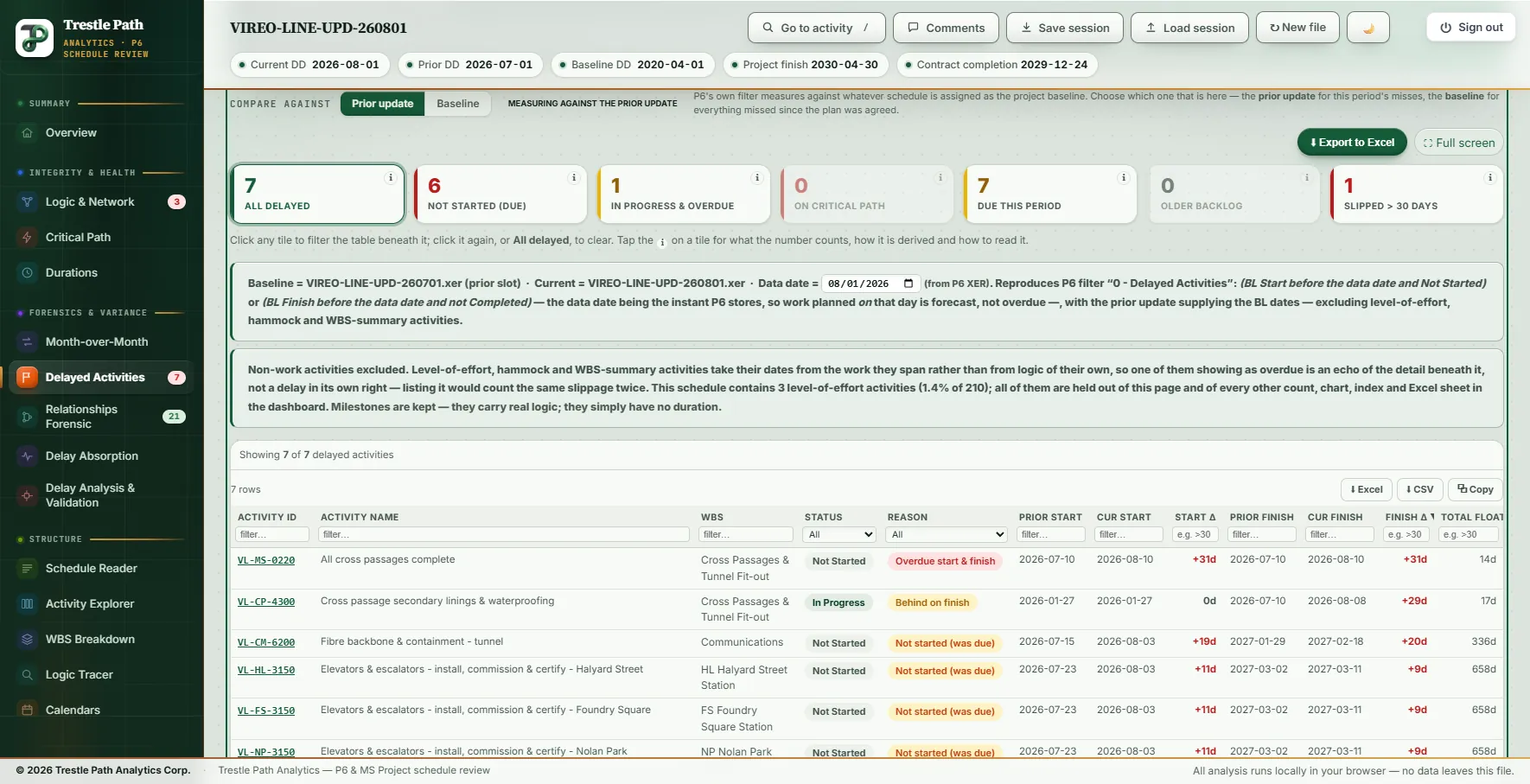
Worked example: a metro schedule's August update
The Vireo Line Extension is a fictional 22,200 ft twin-bore metro extension with five underground stations, built as a demonstration set of a baseline and monthly P6 updates; nothing in it is real. This is the page on the August 2026 update (data date 2026-08-01, a Saturday) against the July 2026 update (2026-07-01), with the 2020 baseline loaded.
The tiles: 7 delayed, 6 not started though due, 1 in progress and overdue, 0 on the critical path, 7 due this period, 0 older backlog, 1 slipped more than 30 days. The median finish slip is 9 days. The file holds three level-of-effort activities, held out; none of them would have appeared under P6's own filter.
| Activity | Reason | July said | August says | Finish Δ | Float |
|---|---|---|---|---|---|
| All cross passages complete (VL-MS-0220, milestone) | Overdue start & finish | 2026-07-10 | 2026-08-10 | +31 d | 14 d |
| Cross passage secondary linings & waterproofing (VL-CP-4300) | Behind on finish | finish 2026-07-10 | finish 2026-08-08 | +29 d | 17 d |
| Fibre backbone & containment, tunnel (VL-CM-6200) | Not started (was due) | start 2026-07-15 | start 2026-08-03 | +20 d | 336 d |
| Elevators & escalators at Halyard Street, Foundry Square, Nolan Park and Winslow Avenue (four activities) | Not started (was due) | start 2026-07-23 | start 2026-08-03 | +9 d each | 658 d |
Everything on the list fell due in July; nothing was carried forward from earlier. None of it is on the critical path, and total float on the seven runs from 14 days on the milestone to 658 on the elevators: late, and not yet driving the completion date. The cross-passage linings are the row to read twice. A month ago they were 94.6 per cent complete with 7 days to go; now they are 95.4 per cent with 6 days to go, and their finish is 29 days later than July said.
Five of the six late starts are now dated 2026-08-03 08:00, the first working hour of their five-day calendar after the data date: starting now. The Month-over-Month page's riding-the-data-date register lists the same five, and none of them was riding the July data date, so this is the first month of the pattern. If September's update dates them to the first working day after its data date again, they will be back here as due this period, and the narrative owes an explanation.
Against the baseline the list is 22: 14 not started though due, 8 in progress and overdue, 2 on the critical path (tunnel invert, walkway & drainage, and tunnel M&E containment), every one more than 30 days later than planned, by up to 201 days (tunnel M&E containment, planned to finish 2026-07-31 and now forecast 2027-02-17), with a median finish slip of 63 days. As the section above warns, all 22 read as due this period against a 2020 baseline.
The data-date box answers two more questions. As of 2026-07-20, three activities were already overdue against the July plan: the milestone, the linings and the fibre backbone. As of 2026-09-01, the list grows to 15: the seven, plus eight more that the July plan had starting or finishing in August and that the August file shows not yet started or not yet finished.
Limits
- It lists, it does not attribute. Who caused a delay, and what it cost, is the work of a delay analysis; see schedule delay analysis from P6 updates.
- Not identical to P6's filter, on purpose. Level-of-effort, hammock and WBS-summary activities are held out, and the data date is an instant. Both differences are stated on the page with the count they remove.
- It matches by Activity ID. Activities added this period, or renumbered, have no reference dates and are not tested.
- Calendar days. Start Δ, Finish Δ and the 30-day tile count calendar days, not working days; total float is the current update's, in days.
- The period split needs the prior update. Against the baseline, Due this period covers everything since the baseline's data date.
Where to find it
Delayed Activities is included in the Analyst and Expert plans and in the fourteen-day trial. Current prices are on the pricing page. The i on each tile is the section's in-product guide to its numbers. For the rest of what changed between the two updates, see how to compare two P6 updates.
Fourteen days free
Try it on your own schedule
Fourteen days free, no credit card, every section open. Your XER or XML file is read in your browser and never uploaded; only anonymous numbers reach the calculation service, and nothing is stored.
RelatedHow to compare two P6 updatesSchedule delay analysis from P6 updates